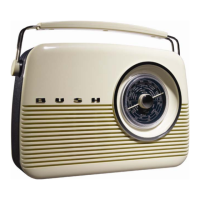
The Bush TR82DAB is a portable digital radio designed to provide a comprehensive listening experience with DAB+, FM, and AM (MW/LW) capabilities, all while maintaining a retro aesthetic. Its design emphasizes ease of use and portability, making it suitable for various environments, from home to office.
Function Description
The primary function of the Bush TR82DAB is to receive and play radio broadcasts across multiple frequency bands. As a DAB+ digital radio, it offers access to a wide range of digital stations with enhanced sound quality and additional information, such as scrolling text (Dynamic Label Segment or DLS) displaying DJ names, artist information, song titles, and other broadcast details. The DAB+ system also boasts interference-free reception, as it leverages reflected signals to reinforce the audio, and eliminates the need for frequent re-tuning by automatically scanning and storing available stations. A single DAB+ frequency can cover a broad area, simplifying the user experience.
Beyond digital radio, the TR82DAB also supports traditional FM and AM (MW/LW) analogue broadcasts, ensuring compatibility with a wide array of existing radio stations. This hybrid functionality allows users to enjoy both modern digital broadcasts and classic analogue transmissions.
The radio features a 2W speaker for clear digital audio output, suitable for general listening. For private listening, a 3.5 mm headphone socket is provided, which automatically mutes the speaker when headphones are plugged in. Additionally, a Line Out Socket allows the digital radio to be connected to a home entertainment system, providing a fixed-level audio signal for external amplification.
Powering the device is flexible, with options for both mains power via an AC power lead and battery operation using six 1.5V (C) batteries, enhancing its portability.
Usage Features
The TR82DAB is designed for intuitive operation, featuring a control panel with various buttons and a tuning dial.
Getting Started and Tuning:
Upon first use, the radio requires connection to mains power or insertion of batteries. The telescopic antenna should be fully extended for optimal reception across all radio modes (DAB+, FM, AM, MW & LW). When switched on and in DAB+ mode for the first time, the radio automatically performs a full station scan, storing all available DAB+ stations in alphanumeric order. The first station in the list will play automatically. If no DAB+ signal is found, relocating the radio may be necessary. For analogue modes (MW/LW/FM), tuning is done manually using the tuning dial and pointer to align with desired frequency markings.
Station Management:
- Changing Stations (DAB+): In DAB+ mode, stations can be scrolled through using the Navigation Buttons (left and right arrows) on the top of the radio.
- Scanning and Storing Stations (DAB+): The "Auto" button initiates a full station search in DAB+ mode, automatically storing all available stations. The display shows a bar graph indicating scan progress and the number of stations found. Symbols like '?' (inactive/unavailable), '>>' (primary station with secondary services), and '<<' (secondary station) provide additional information about the stations.
- Station Presets: The radio allows for up to 10 station presets across all modes. Each preset button (1&6, 2&7, 3&8, 4&9, 5&10) holds two preset positions. To store a station, tune to it, then press and hold the desired preset button. For presets 6-10, the "Shift" button must be held down simultaneously. Storing a new station in an occupied preset position will override the previous one. To play a stored preset, a brief press of the relevant preset button is sufficient. If a preset is empty, "Empty preset" will be displayed.
- Resetting Preset Stations: All preset stations can be deleted, and the DAB+ radio can be returned to factory settings by pressing and holding the "Menu" button, then confirming with the "Select" button. This action will initiate a new scan for stations.
Audio Control:
- Volume Adjustment: A volume wheel on the top of the radio allows for easy adjustment of the listening level. Turning it right increases volume, and turning it left decreases it.
- Tone Control: A dedicated tone dial enables adjustment of the audio output's treble and bass frequencies. Turning the dial right enhances treble, while turning it left enhances bass.
- Dynamic Range Control (DRC): In DAB+ mode, the DRC feature allows users to apply compression to the audio, compensating for differences in dynamic range between radio stations. There are three levels: DRC 0 (no compression), DRC 1 (maximum compression, default), and DRC ½ (medium compression). This feature is accessible via the Menu options and allows listeners to tailor the sound to their preference, especially useful for different music genres.
- LCD Display: A high-resolution LCD display shows onscreen information and scrolling text.
- Viewing Station Information (DAB+): While listening to a DAB+ station, pressing the "Display" button repeatedly cycles through various information provided by the broadcaster, including Dynamic Label Segment (DLS) for scrolling text, Program Type (PTY) describing the program content, Multiplex Name indicating the broadcasting multiplex, and Time and Date.
The "Menu" button provides access to system options, including:
- Station Order: Allows users to define how stations are arranged in the station list.
- Manual Tune: Enables manual scanning through radio frequencies, useful for finding weak stations or those not detected during auto-scan. A signal strength indicator helps optimize aerial position.
- DRC Value: As described above, allows selection of the dynamic range compression level.
- SW Version: Displays the software version of the product.
Maintenance Features
The Bush TR82DAB is designed for straightforward maintenance, primarily focusing on cleaning and general care.
Cleaning:
Before cleaning, the unit must be disconnected from the mains supply. Only a dry, soft, dust-free cloth should be used. Liquid or aerosol cleaners are explicitly prohibited as they may damage the unit.
Safety Considerations (Preventative Maintenance):
The manual emphasizes several safety considerations that contribute to the longevity and proper functioning of the device:
- Cable Protection: Ensure power and connected cables are protected from being walked on, pinched, or damaged.
- Environmental Protection: The unit should not be positioned in humid or damp conditions, allowed to get wet, or exposed to dripping or splashing water. It should also be kept away from heat-radiating sources and dusty environments.
- Ventilation: Ventilation holes must not be covered by items like tablecloths or curtains to prevent overheating. The unit should not be placed in a closed cabinet without proper ventilation.
- Foreign Objects: Children should be prevented from inserting foreign objects into the unit's holes or slots.
- Flame Sources: No naked flame sources, such as candles, should be placed on or near the unit.
- Liquid Containers: Objects filled with liquids, such as vases or jugs, should not be placed on or near the unit.
Servicing:
The device contains no user-serviceable parts. In case of a fault, users are advised to consult a qualified service technician or their retailer. Attempting to repair the unit oneself will invalidate the warranty. Troubleshooting tips are provided for common issues like no sound, unresponsive buttons, or poor radio reception, often suggesting simple solutions such as checking headphone connections, adjusting volume, reconnecting power, or repositioning the aerial. For more persistent issues, contacting the Bush Warranty service is recommended.


 To Next Page
 General










