21
or online at www.bush-support.com If you still require further assistance, call one of our experts on 0345 604 0105.
Getting to know your TV
You’ll be up and running in no time
Getting to know your TV
Initial setup
1. Connect one end of the RF coaxial cable to the aerial
socket on the wall and the other end of the cable to the
RF (75
Ω
) socket at the back of your TV.
2. Connect the mains cable to the mains socket after
you have completed all the connections.
3. With power cord plug connected to the mains power
socket and TV in 'Standby' mode. At this stage, the TV
switches to standby mode. The red LED indicator will
illuminate on the front panel of the TV.
4. In standby mode, press the “ ” button on the back
of the TV or the “ ” button on the remote control to
turn the TV on. The red LED indicator will turn blue.
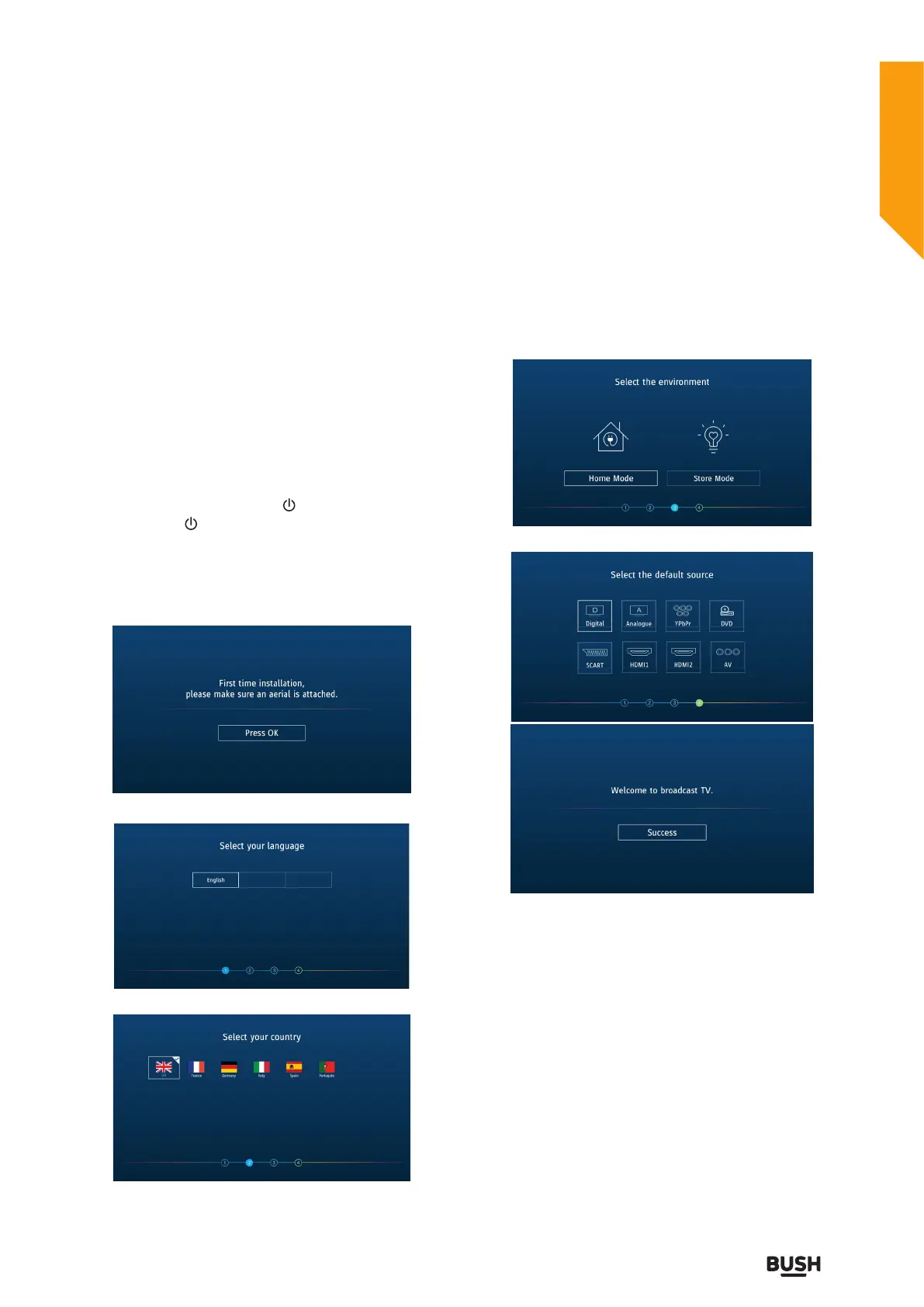
5. The first time you turn the TV on, please ensure the
TV is connected to the aerial, then press the OK buttons
for the next setup.
6. Select your language.
7. Press the
buttons to select your country.
8. Press the
buttons to select the environment.
• Home Mode: Viewing at home.
• Store Mode: For store demo, the brightness is higher
than home mode but consumes more power.
9. Press the
buttons to select the default source.



 To Next Page