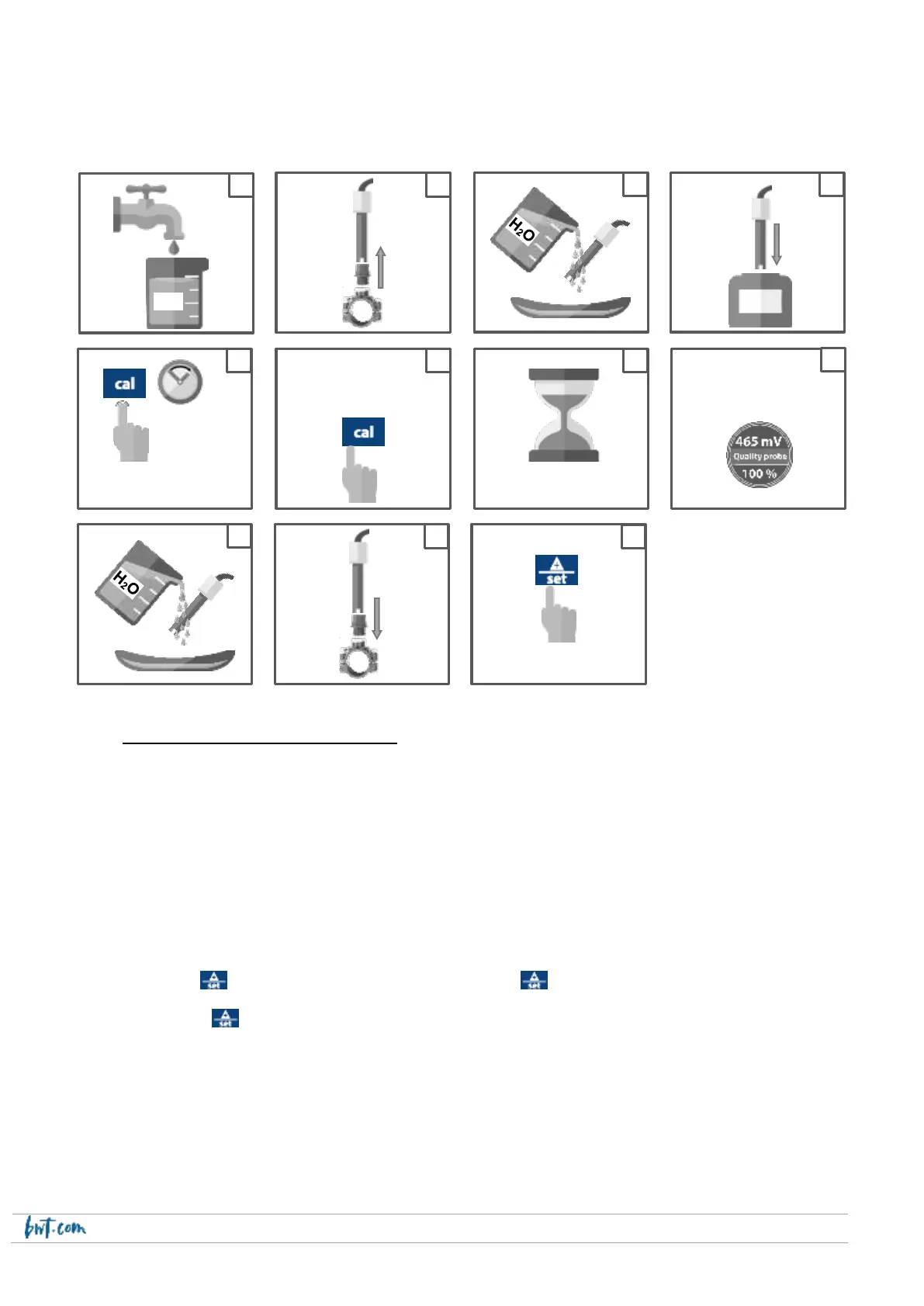
Calibration of the ORP probe
Put the switch to 1 and follow the steps below:
14.4 BWT Easy Dose ORP Electrolyser
Switch positions:
1 : Normal position to control generation of Chlorine by the electrolyser. The electrolyser generates Chlorine
when both EASY DOSE and the electrolyser are energized, the devices are connected to each other, and
the ORP setpoint has not been reached.
0: EASYDOSE is stopped, the electrolyser does not produce Chlorine.
Selecting the setpoint:
a. Put the switch to 1
b. Press the key until the setpoint value flashes, then press again to scroll through the setpoint values until
the desired value is displayed.
c. Release the key, 3 seconds later mem will be displayed on screen.
Nota Bene :
- the ORP setpoint can be adjusted between 450 and 980 mV in increments of 10 mV.
- If the measured value is below 400 mV or above 999 mV, the screen will flash.
- The ORP probe measurement range is between 400 and 999 mV.


 To Next Page