usually used to shift the line over only a short distance such as may be needed to set the initial data
transfer position (see section 4.5).
When these controls are being used the speed of the spool’s rotation is limited for safety and
practicality.
4.3 Accessing and Navigating the Control Software
The control software is accessed by entering the IP address (192.168.0.10 or other, DHCP assigned
address) or hostname (vigo) of the winch into a web browser. The software is served on port 10000
and as a result the address should be entered into the address bar in the following format:
http://x.x.x.x:10000 or http://vigo:10000 if a DNS server is running on the network.
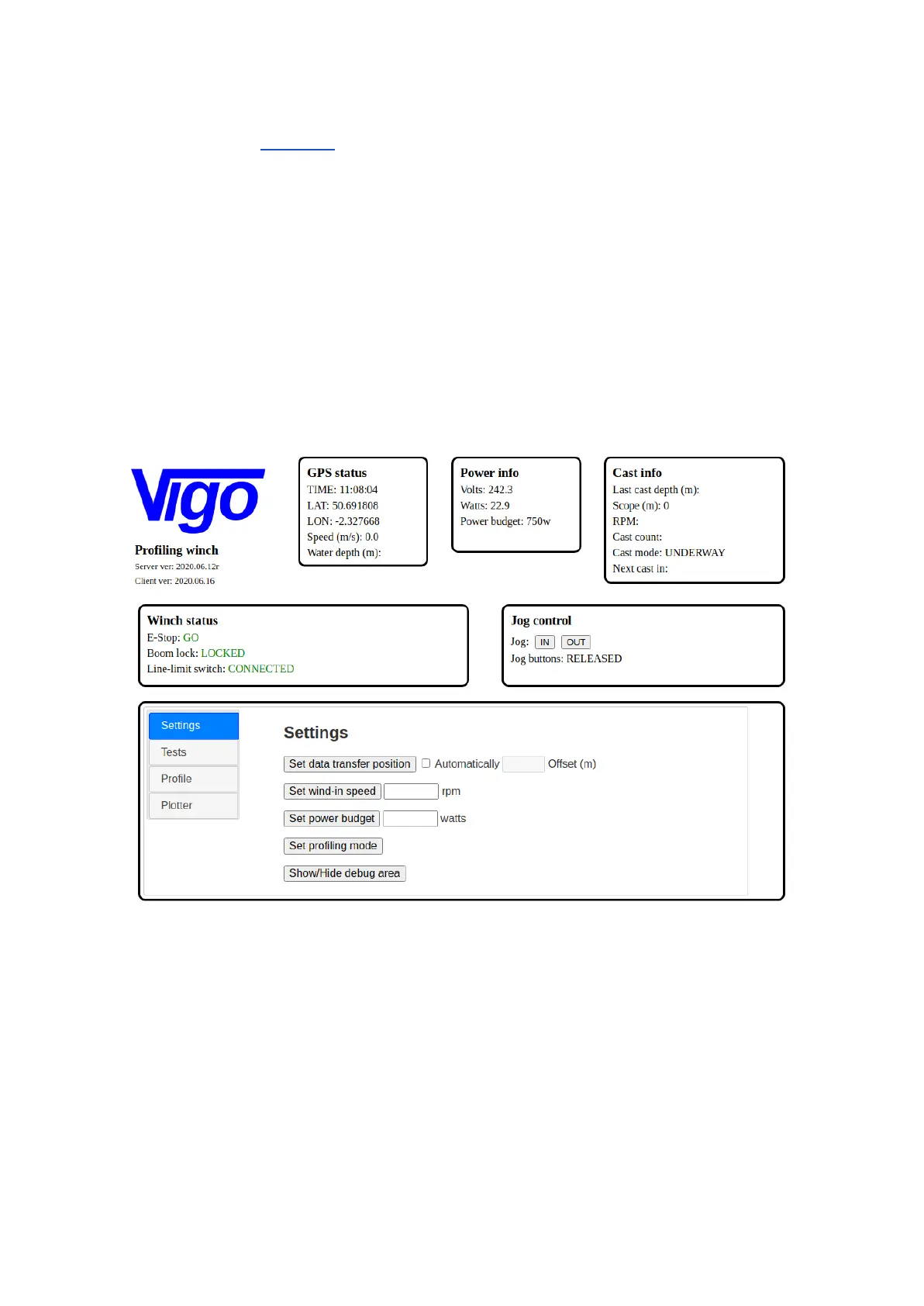
The following page is displayed when the connection to the software is successful:
The Vigo web-based control software
The software presents a single page application to the user. The main application window is divided
into three main areas :-
1. Status area
2. Jog control
3. Tabbed pane with 4 horizontal tabs
The Status area comprises the section of the screen marked ‘GPS status’, ‘Power info’, ‘Cast info’
and ‘Winch status’.



 To Next Page