Cadillac XTS Owner Manual (GMNA-Localizing-MidEast-10292881) - 2017 -
crc - 7/1/16
INSTRUMENTS AND CONTROLS 133
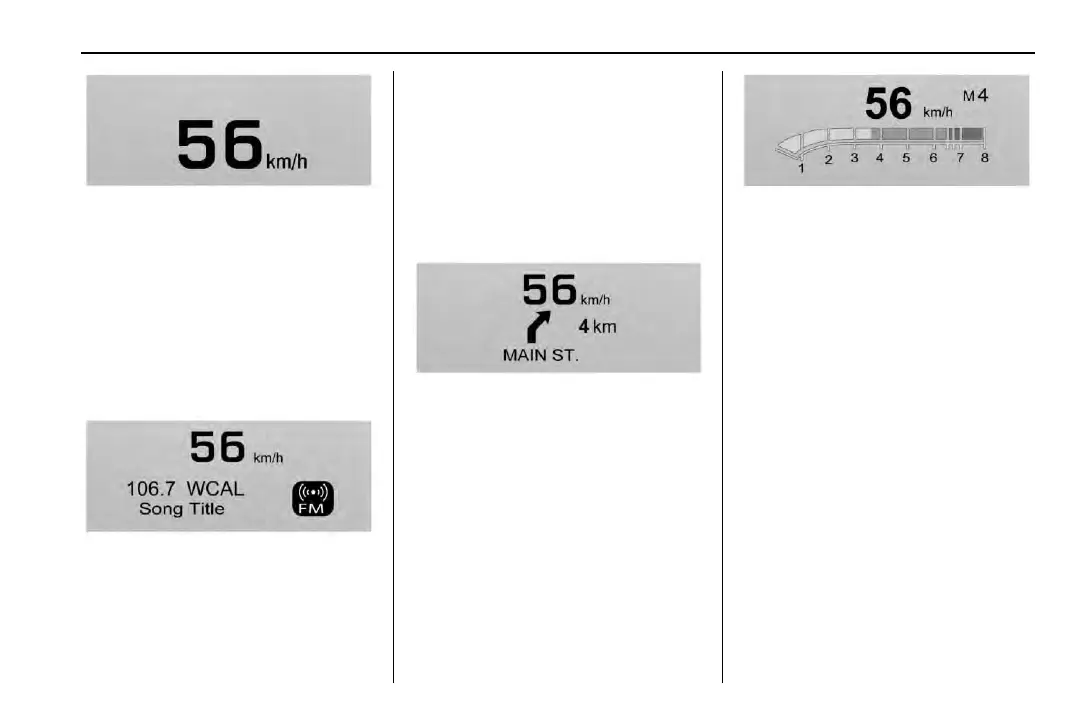
Speed View : This display gives the
speedometer reading (in English or
metric units), speed sign advisor,
Adaptive Cruise Control speed, Lane
Departure Warning, and Vehicle
Ahead indicator. Some information
only appears on vehicles that have
these features, and when they are
active.
Audio/Phone View : This display
includes the information in speed
view along with audio/phone
information. The current radio station,
media type, and incoming calls will be
displayed.
All HUD views may briefly display
audio information when the driver
uses the steering wheel controls to
adjust the audio settings appearing in
the instrument cluster.
Incoming phone calls appearing in the
instrument cluster, may also display
in any HUD view.
Navigation View : This display
includes the information in speed
view along with Turn-by-Turn
Navigation information. The compass
heading is displayed when navigation
routing is not active.
Navigation Turn-by-Turn Alerts
shown in the instrument cluster may
also be displayed in any HUD view.
Performance View : This display
gives the speedometer reading (in
English or metric units), rpm reading,
transmission positions, and gear shift
indicator.
Care of the HUD
Clean the inside of the windshield to
remove any dirt or film that could
reduce the sharpness or clarity of the
HUD image.
Clean the HUD lens with a soft cloth
sprayed with glass cleaner. Wipe the
lens gently, then dr y it.
HUD Troubleshooting
Check that:
.
Nothing is covering the HUD lens.
.
HUD brightness setting is not too
dim or too bright.



 To Next Page