24
5.2 Battery
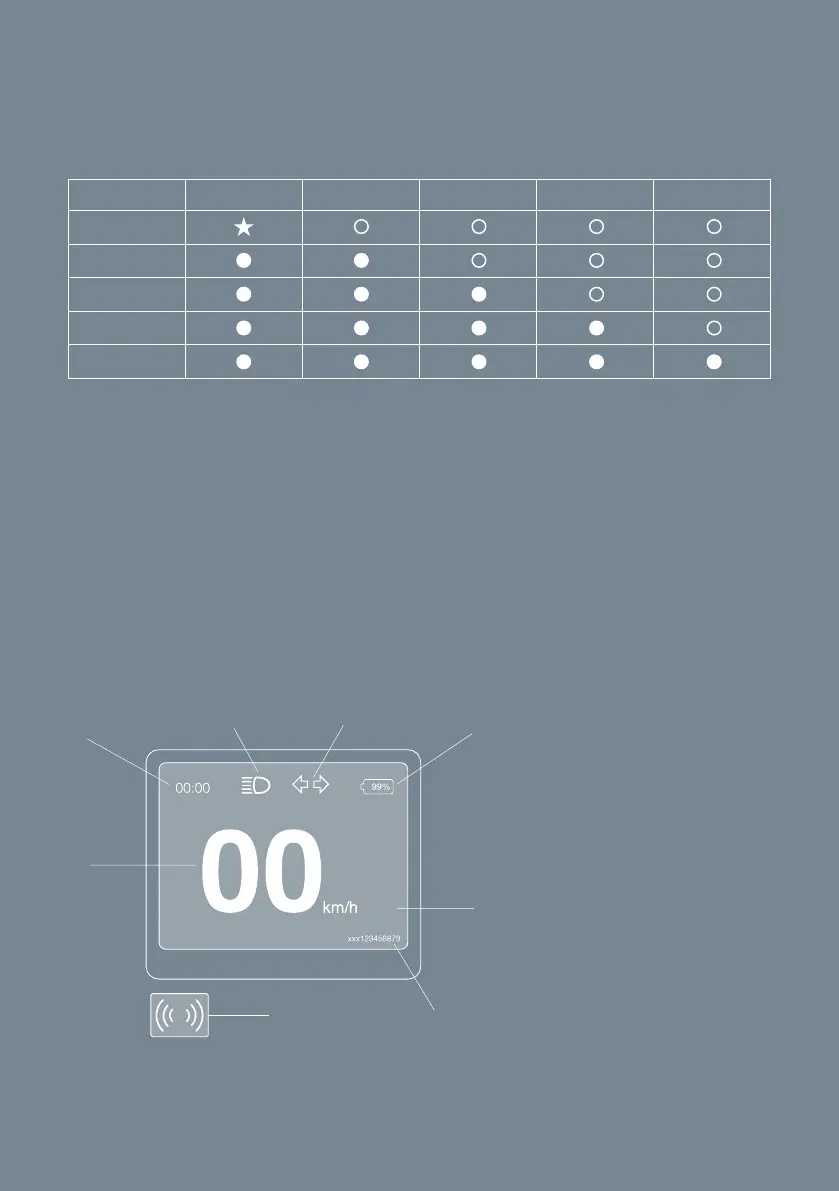
The battery has five SoC LEDs located on the top of the battery. Battery State
of Charge shown on the display indicates in percentage. To check the battery
SOC LED 1 LED 2 LED 3 LED 4 LED 5
0 ~ 20%
21 ~ 40%
41 ~ 60%
61 ~ 80%
81 ~ 100%
A
B
H
E
F
G
R1
A. Speedometer
B. Clock
C. Light Symbol
D. Turn signal
E. SoC
F. Ride Mode
G. Key card symbol
( at start-up )
H. Error indication
SOC, do either of the following:
• Push the battery button. => The 5 battery LEDs are activated and indicate
the SOC.
• When the vehicle has been activated, see SOC indication on the display.
• Check the SOC in the CAKE app when battery connected to bike
5.3 Display
Fig. 9



 To Next Page