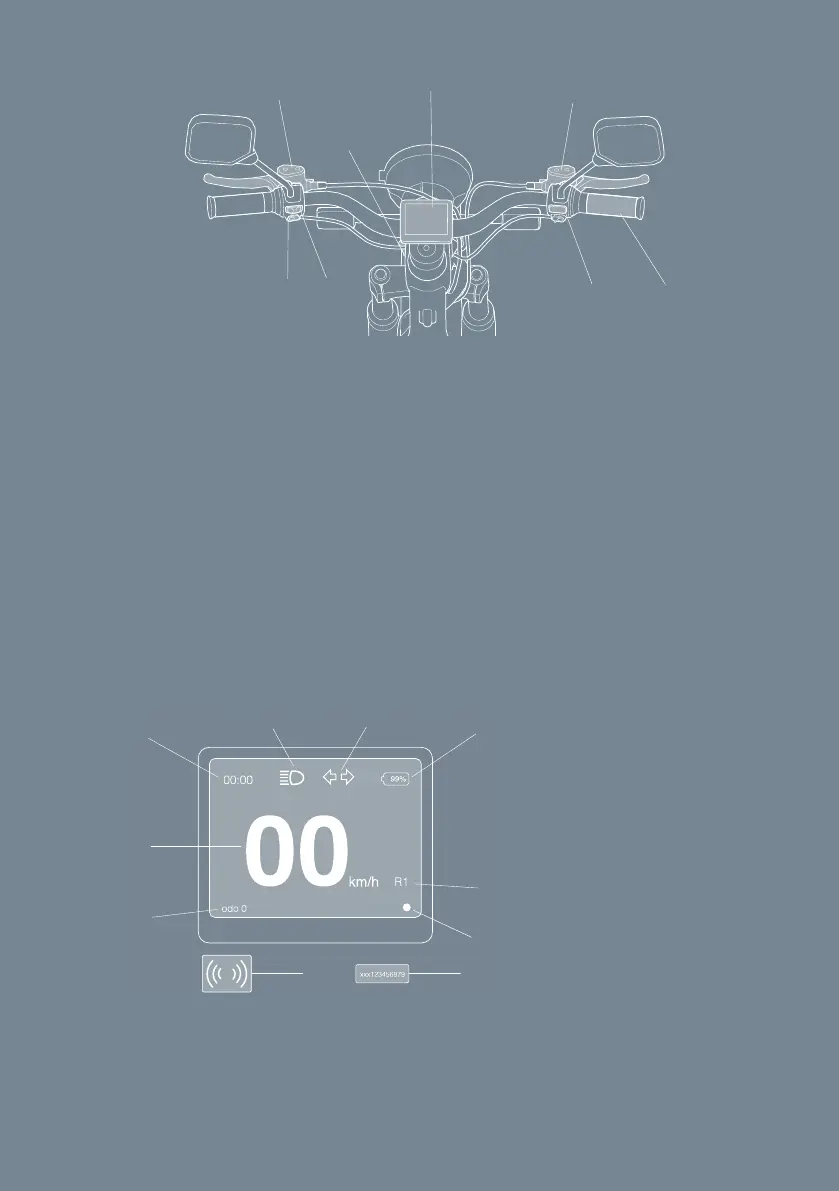
AB
C
D
E
F
H G
A. Head/taillight button
B. Turning lights button
C. Rear brake
D. Steering lock key
E. Display
F. Front brake
G. Right hand throttle
H. Start button
1.
2. Push and hold the start button for 2 seconds, see Fig. 4. => The key card
symbol is shown pulsating on the display.
3. Place the key card on the key card symbol => Headlights and taillights
light up. The vehicle is activated and unlocked.
4. Fold up the side-stand. => On the display, the side-stand symbol disappears,
see Fig. 5.
Fig. 4
Fig. 5
A. Odometer
B. Speedometer
C. Time
D. Head/tail lights
E. Turn signals
F. Battery level
G. Ride mode
H. Key card symbol
(at start-up)
I. Error indication
J. Side stand (when down)
A
B
C
D E
F
G
H
I
J
16


 To Next Page