9
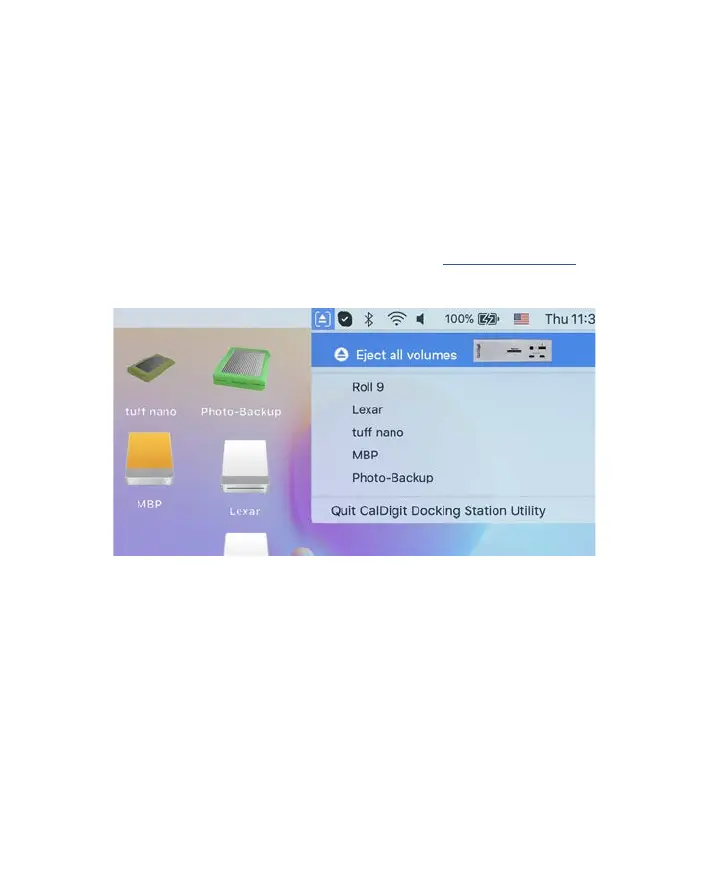
The CalDigit Docking Station Utility for macOS makes it incredibly easy to
disconnect all your USB storage devices from the TS4 without the need to
manually disconnect them one by one.
Disconnecting all USB storage devices
1. Open the CalDigit Docking Station Utility on the top menu bar.
2. Click the eject button on the TS4 image.
Disconnecting individual USB storage devices
1. Open the CalDigit Docking Station Utility on the top menu bar.
2. Click on the specic USB device you would like to eject. Only that device
will be ejected.
NOTE
The CalDigit Docking Station Utility Installer le needs to be downloaded and installed
on your Mac from the CalDigit website. Please go to downloads.caldigit.com to
download the Installer package.
CalDigit Docking Station Utility


 To Next Page