22
Media Operation
Picture
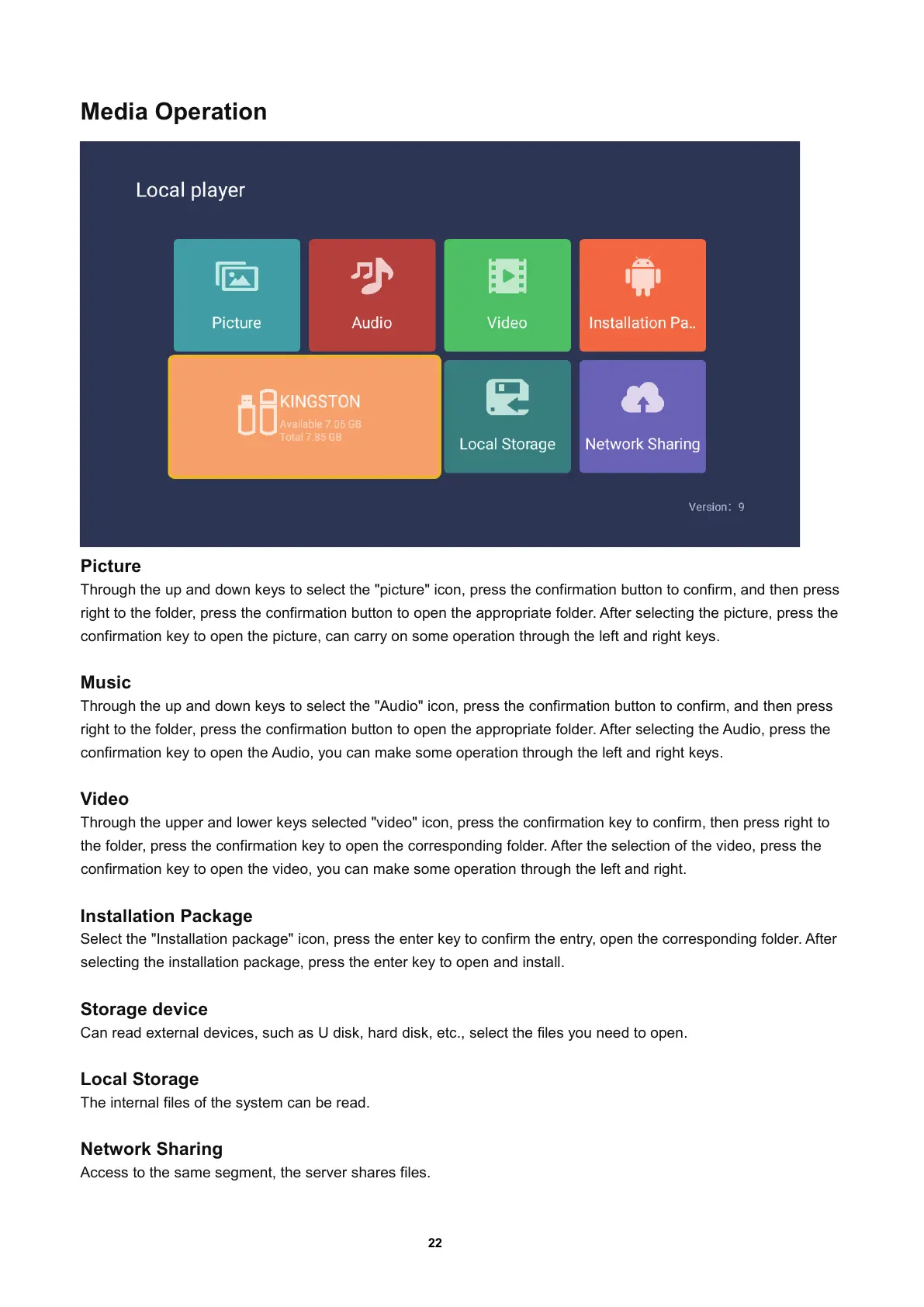
Through the up and down keys to select the "picture" icon, press the confirmation button to confirm, and then press
right to the folder
, press the confirmation button to open the appropriate folder. After selecting the picture, press the
confirmation key to open the picture
, can carry on some operation through the left and right keys.
Music
Through the up and down keys to select the "Audio" icon, press the confirmation button to confirm, and then press
right to the folder
, press the confirmation button to open the appropriate folder. After selecting the Audio, press the
confirmation key to open the Audio
, you can make some operation through the left and right keys.
Video
Through the upper and lower keys selected "video" icon, press the confirmation key to confirm, then press right to
the folder
, press the confirmation key to open the corresponding folder.Aftertheselectionofthevideo, press the
confirmation key to open the video
, you can make some operation through the left and right.
Installation Package
Select the "Installation package" icon, press the enter key to confirm the entry, open the corresponding folder. After
selecting the installation package
, press the enter key to open and install.
Storage device
Can read external devices, such as U disk, hard disk, etc., select the files you need to open.
Local Storage
The internal files of the system can be read.
Network Sharing
Access to the same segment, the server shares files.


 To Next Page