7.4.1TurnonWifi
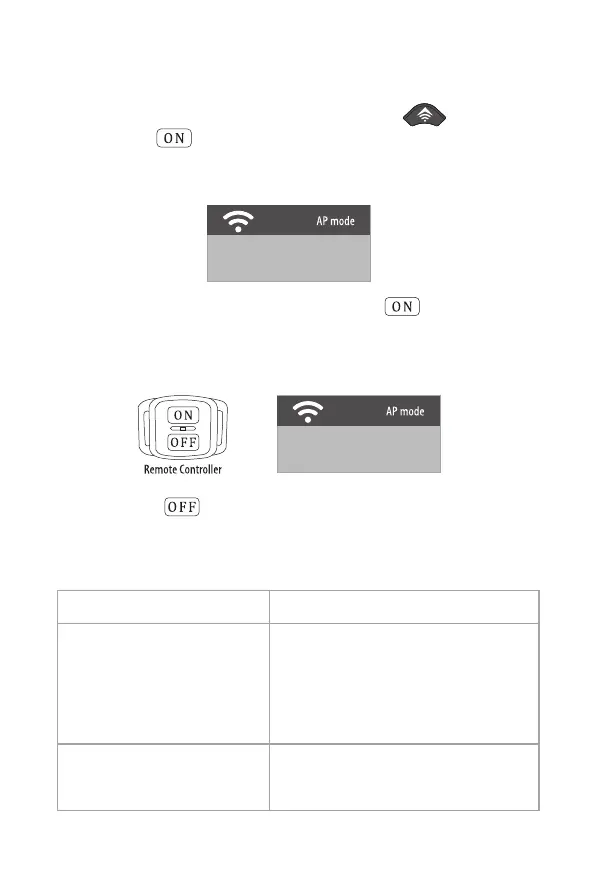
1.WhenthecameraisinSETUPmode,pressandholdUPbuttonin
thecameraorbuttonintheremotecontroller.Thescreendisplays
the“ WIFI”connectioninterface.Theredindicatorflashesrapidlyandthe
camerahasopenWIFI,thecameraconnectioninterfaceisasshownbelow.
SSID:Campark-T80-****
PWD:12345678
2.WhenthecameraisinON(monitormode),pressontheremote
controller,thescreendisplaysthe“ WIFI”connectioninterface,the
indicatorlightontheremotecontrolflashesrapidly,andthecamera
hasopenWIFI,thecameraconnectioninterfaceisasshownbelow.
SSID:Campark-T80-****
PWD:12345678
Whenpressthebuttonintheremotecontroller,theWIFIhotspots
wouldbeturnOff,andthecamerawouldreturntothe“ ON”monitormode.
BelowistheredLEDindicatelightworkingmodewhenincameraon/
connectionsuccess/WIFIhotspotsturnonandoff.
OpentheWIFIhotspots
TheMobilePhoneconnects
successfullywiththeWIFIhotspots
TurnofftheHotspots
TheredLEDindicatelightwouldkeepflashing
WhentheMobilephoneconnectssuccessfully
withtheWIFIhotspots,theredLEDindicate
lightwouldbethestateof“ on”,iffailto
connectwiththehotspots,thecamerawould
automaticallyturnoffthehotspotsafter
oneminute.
Whenturnoffthehotspots,theredLED
indicatedlightwouldflash5sec.andthen
camerawouldbebacktothesettingmode.
20


 To Next Page