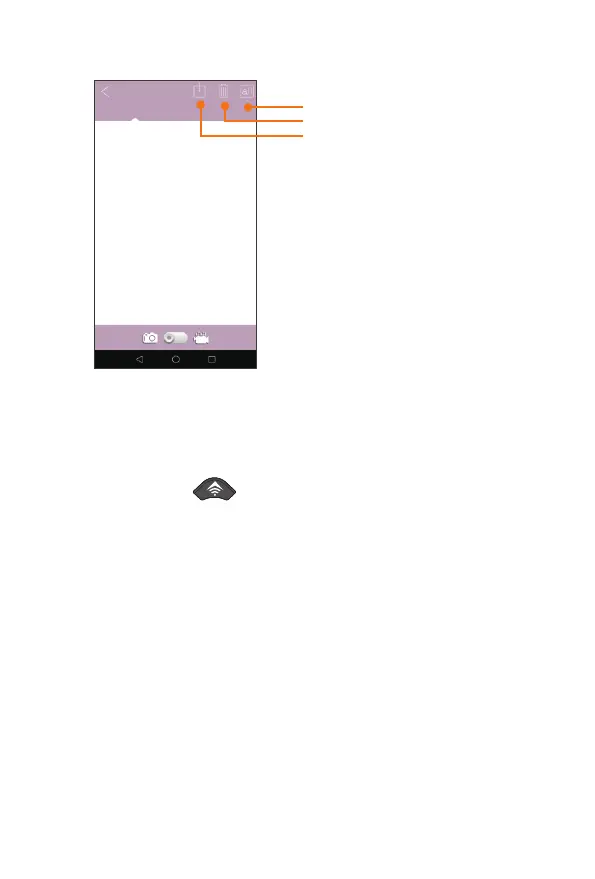
Devicealbum Savedalbum
Downloadbutton
Deletebutton
SelectAllfilesbutton
SwitchButton(forphotoandvideo
previewswitching)
7.4.4.ExitWIFI
1.Pressandhold3SWiFibuttoninthecameraorOFFbuttoninthe
remotecontrollertoexitWIFI,theindicatorwillflashabout5seconds,then
thecamerawillautomaticallyreturntoSETUPmodeorONmode.
2.ClicktheredWIFIicontodisconnectWIFI,theindicatorwillflashabout
5seconds,thenthecamerawillalsoautomaticallyreturnto“ON”modeor
SETUPmode.
3.WhenthecameraisturnonandAPPisconnected,ifthereisnotany
operationwithinthedefaulted“ AutoWIFIOff”time.Thecamerawouldalso
automaticallyexitWIFIfunctionandreturnbacktotheONorSETUPmode.
23


 To Next Page