36
DR(H,W) Lead Lag Operation
Master Boiler
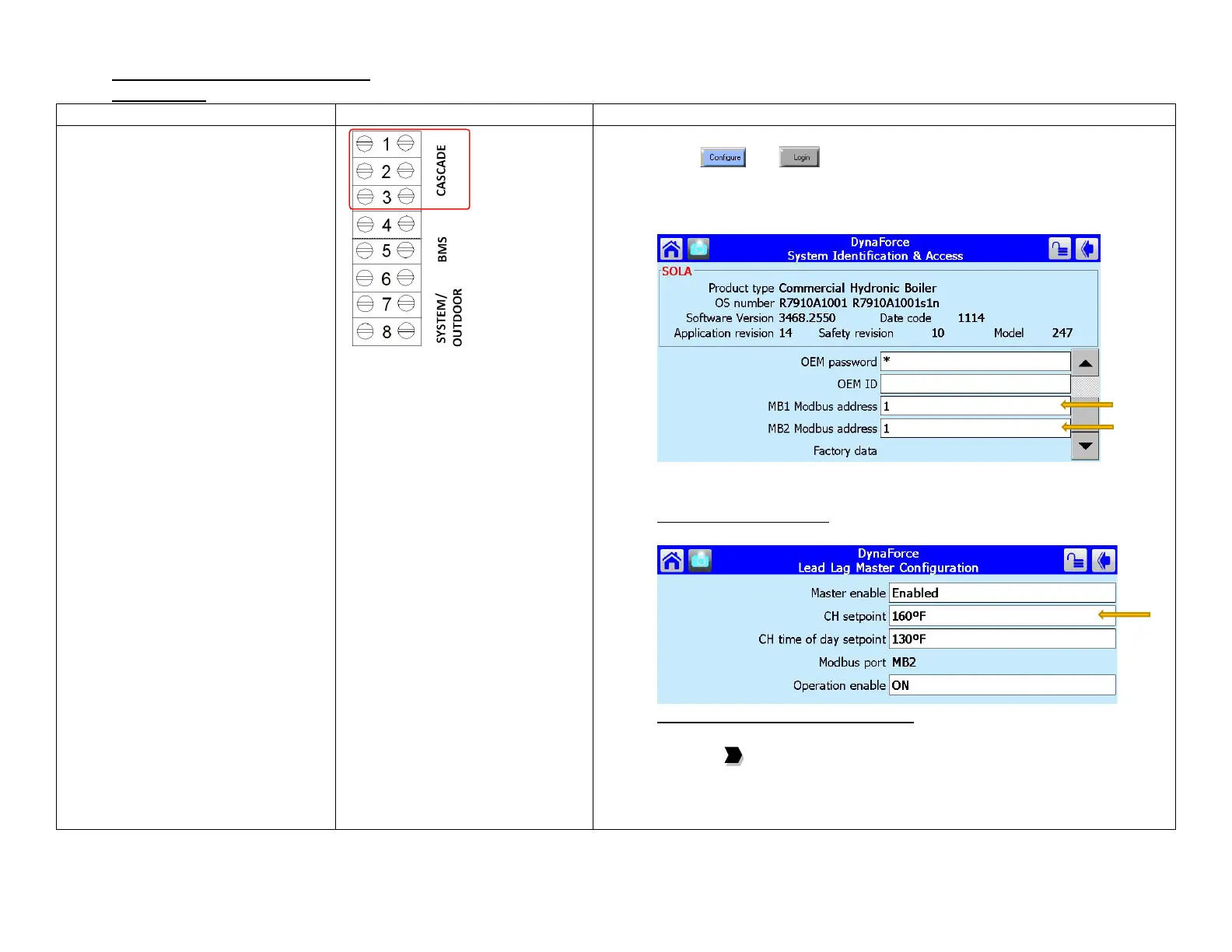
• Master boiler lead lag setup
1) Place toggle switch to LOCAL
2) Press and
3) Select System Identification & Access
4) Verify MB1 Modbus address = 1
5) Verify MB2 Modbus address = 1
6) Select Lead Lag Master Configuration
7) Select Master Enabled = Enabled
Fixed Setpoint operation
8) Enter CH Setpoint (Fixed setpoint)
4-20mA/ 0-10Vdc setpoint operation
9) Select [Advanced Settings >]
10) Press the to arrive at Central Heat
11) Select Setpoint Source = S2 (J8-6) 4-20mA
12) Select 4mA water temperature
13) Select 20mA water temperature


 To Next Page