47
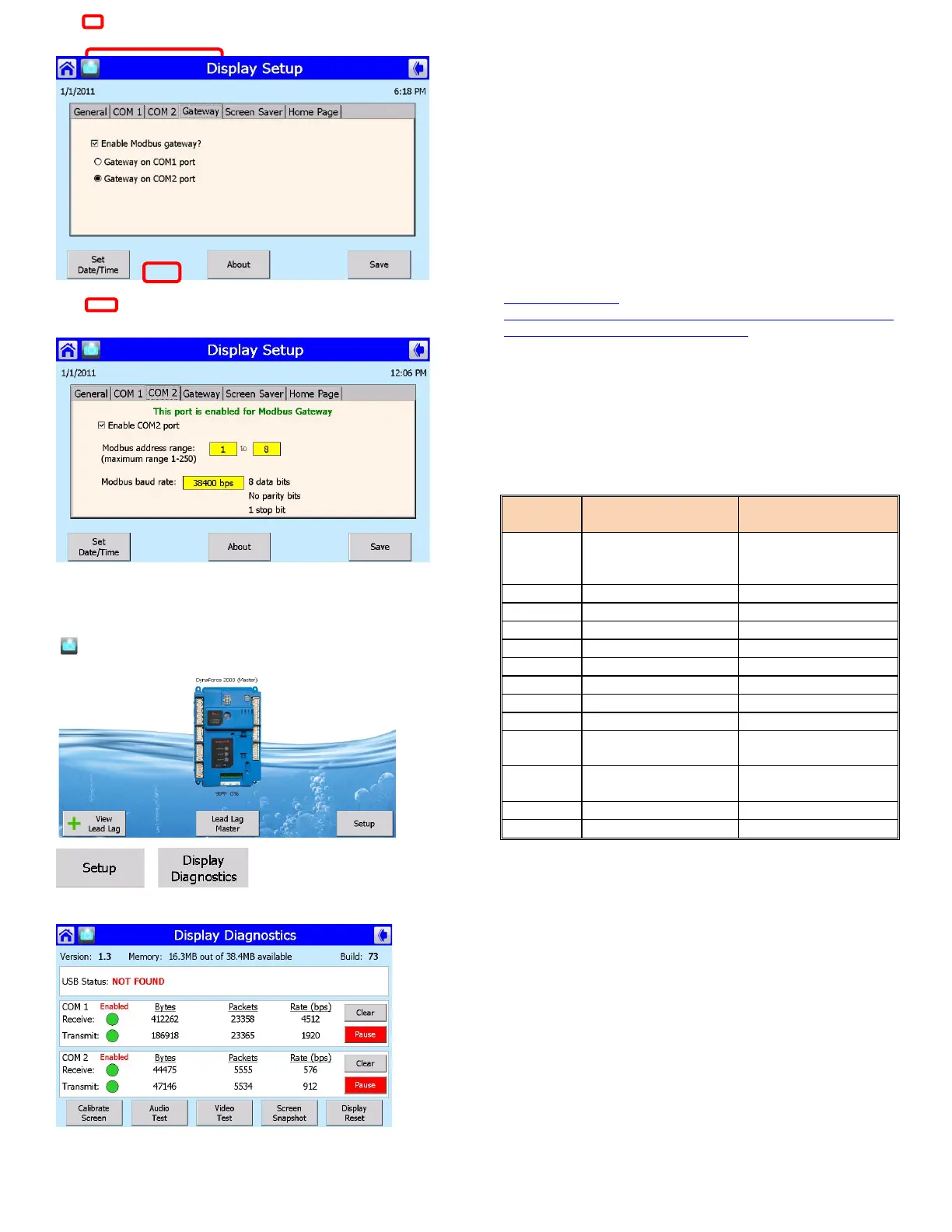
1) Select Gateway tab
2) Check Enable Modbus gateway
3) Select Gateway on COM2 port
1) Select COM2 tab
2) Check Enable COM2 port
Verify activity on COM2 port
>
>
COM1: Modbus data between display and SOLA
COM2: Modbus data between display and front end (Modbus)
or Protonode
For more instructions on interfacing with Modbus/ Bacnet/
LonWorks/ Metasys N2 network:
http://www.camus-
hydronics.com/media/1296/93_0238_dynaflame_dynaforce_dy
namaxhs_advantus_protocol_setup.pdf
6.6 VARIABLE FREQUENCY DRIVE
(DR1200 - 5000)
The variable frequency drive (VFD) has a factory set security
code which has to be entered before any adjustments can be
made. The VFD has 50 parameters, which can be adjusted. At
present only the following are pertinent:
Table 13: Variable Frequency Drive Parameters
Function Settings
Input Voltage 120, 220-
01
Consult factory test sticker
Consult factory test sticker
6.7 FROST PROTECTION
The Dynaforce® is equipped with a heat exchanger frost
protection algorithm where if the boiler inlet or outlet
temperature sensors drop below 41
o
F (5
o
C) the boiler pump is
enabled. If the temperature continues to drop to 38
o
F (3.3
o
C) the
burner will be fired to bring the inlet and outlet temperatures to
50
o
F (10
o
C) to prevent freezing of the heat exchanger.


 To Next Page