EasyManua.ls Logo

Camus Hydronics Dynaforce Series - CONFIGURE MENU; SYSTEM IDENTIFICATION & ACCESS; PUMP CONFIGURATION

Camus Hydronics Dynaforce Series
82 pages
Print Icon
To Next Page IconTo Next Page
To Previous Page IconTo Previous Page
Loading...
44
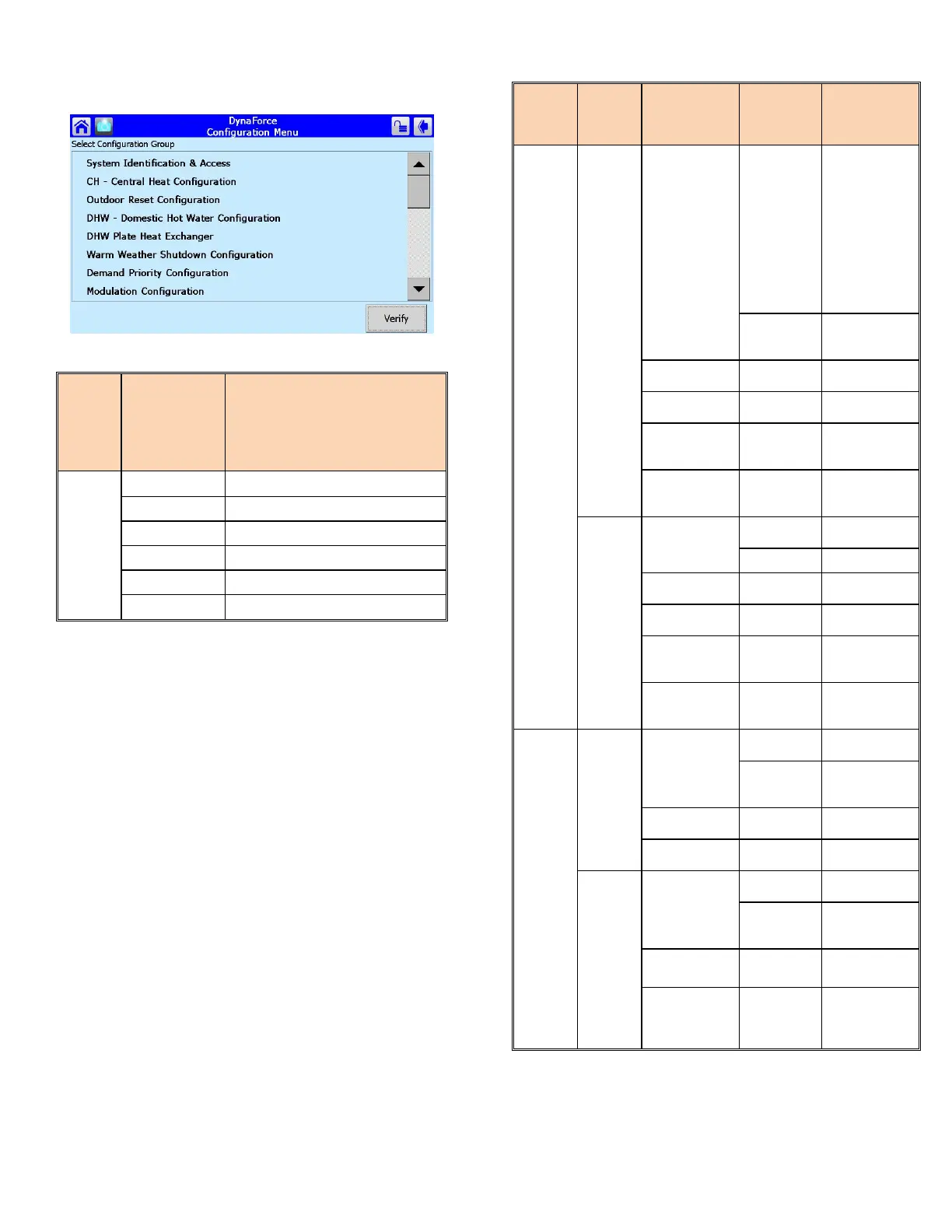
6.2 CONFIGURE MENU
Figure 26: Configure Menu
6.2.1 System Identification & Access
Menu
Group
Selection
Parameter Description
System Identification &
Access
Product Type
Commercial Hydronic Boiler
OS number
Part Number of SOLA Controller
Software Version
Software version
Date Code:
Release date of software
Boiler Name
Dynaforce® Model Number
Installation
Type of application
6.2.2 Pump Configuration
Menu
Group
Selection
Sub-
Menu
Group
Selection
Parameter Selection Description
Pump Configuration
Central Heat Pump
Pump Control
Auto
Assigns the
method for
SOLA to control
a Central
Heating pump
(Default: Auto,
Pump is
activated
whenever a call
for heat is
present)
ON
ON: Pump is
constantly
powered
Pump Output Pump B
Specify pump
contact
Over run time 1..5 min
Post pump time
(Default: 1 min)
Use for local
(Stand-alone)
demands
Use for Lead
Lag Master
demands
Boiler Pump
Pump Control
Auto
Refer to above
(Default)
ON
Refer to above
Pump Output Pump A
Specify pump
contact
Over run time 1..5 min
Post pump time
(Default: 1 min)
Use for local
(Stand-alone)
demands
Use for Lead
Lag Master
demands
Pump Configuration
DHW Pump
Pump Control
Auto
Refer to above
(Default)
ON
ON: Pump is
constantly
powered
Pump Output Pump B
Specify pump
contact
Over run time 1..5 min
Post pump time
(Default: 1 min)
System Pump
Pump Control
Auto
Refer to above
(Default)
ON
ON: Pump is
constantly
powered
Pump Output None
Specify pump
contact
Over run time 1..5 min
Post pump time
(Default: 1 min)

Table of Contents

Related product manuals