EasyManua.ls Logo

Canon 550ex - Wireless Manual Flash with Uniform Flash Output

Canon 550ex
49 pages
Print Icon
To Next Page IconTo Next Page
To Previous Page IconTo Previous Page
Loading...
l3l
Wireless
Manual Flash
After
setting up the
wireless flash
system,
you
can
manually
set the slave
unit's
flash
output
with
the
master
unit.
The flash
output
can be uniform
or
varied
among the slave units.
To
determine the
proper
flash
exposure,
use a
hand-held flash meter.
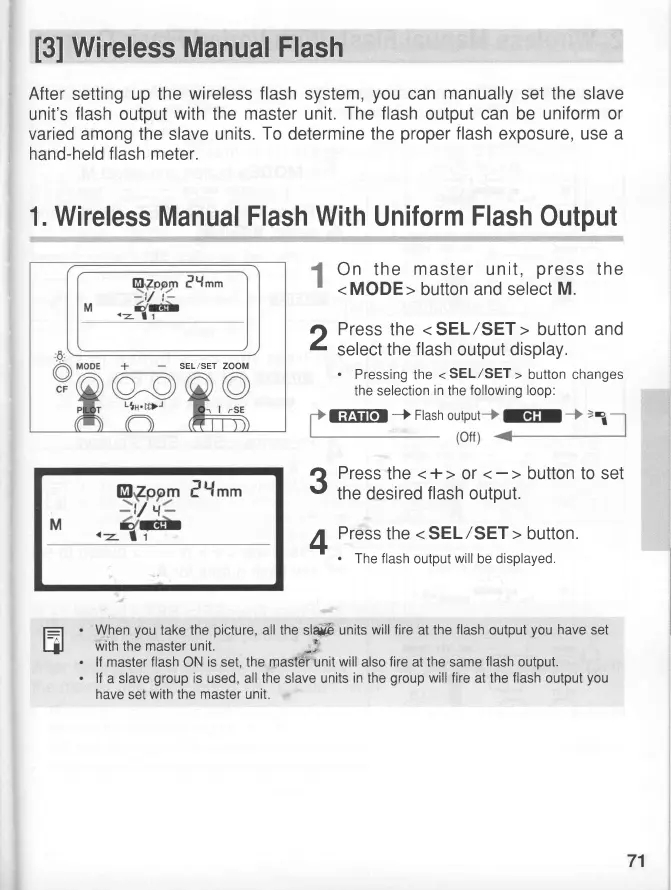
1. Wireless Manual Flash
With
Uniform
Flash
Output
On the
master
unit,
press
the
< MODE >
button and select
M.
.r
Press
the
<
SEL
/SET
>
button and
I
select the
flash
output
display.
.
Pressing
the
<
SEL/SET
>
button
changes
the selection
in
the
following loop:
?
Press
the
<+>
or
v
the desired
flash
output.
4
Press
the
< SEL/SET
>
button.
-
.
The flash
output
will
be
displayed.
E
When
you
take the
picture,
all the sla*b
units
will fire
at the
flash
output
you
have
set
with
the
master
unit.
*
lf master flash
ON
is
set,
the
mastdiinit will
also
fire
at the same
flash
output.
lf
a slave
group
is
used, all the slave units
in
the
group
will fire
at the
flash
output
you
have
set
with the
master
unit
+
SEL/SET
ZOOM
fiFllfor
J
Flash
71

Related product manuals