EasyManua.ls Logo

Canon 550ex - Wireless Flash Range

Canon 550ex
49 pages
Print Icon
To Next Page IconTo Next Page
To Previous Page IconTo Previous Page
Loading...
6.
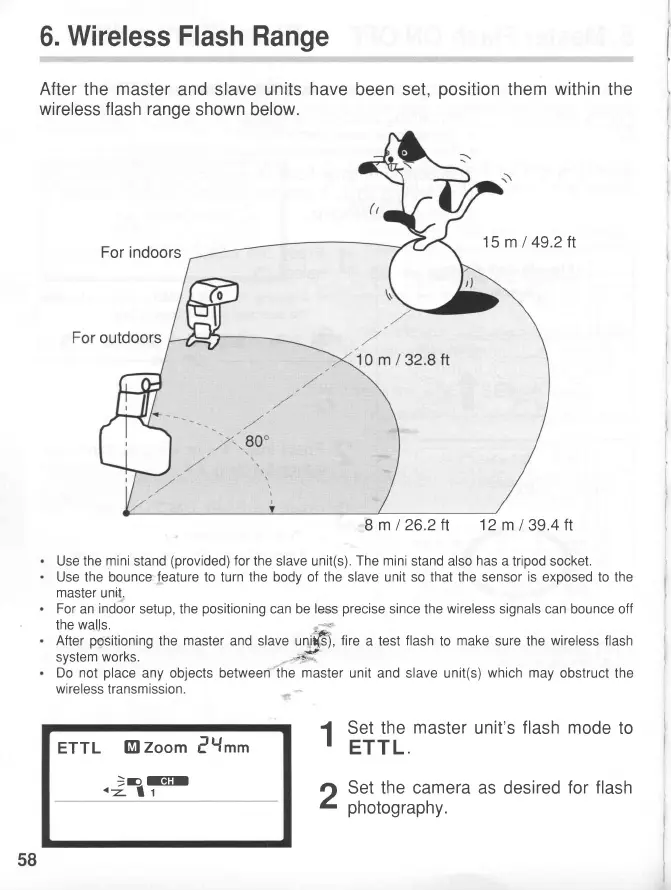
Wireless Flash Range
After
the
master
and slave units
have
been set,
position
them
within
the
wireless flash range
shown below.
Use the
mini
stand
(provided)
for
the slave unit(s).
The mini
stand also
has
a tripod socket.
Use the bounce
feature
to turn the body of the slave unit so that the sensor
is
exposed to
the
master
unit.
For
an
indoor
setup, the
positioning
can be
less
precise
since the
wireless
signals can bounce off
the
walls
After
positioning
the
master
and slave uni$),
fire
a test
flash
to
make
sure
the
wireless
flash
system
works.
*.t'
Do not
place
any objects between the
master
unit and slave unit(s)
which may
obstruct
the
wireless
transmission.
ETTL
El
zoom
l{tt
.}nt!@
1
Set the
master
unit's
flash mode
to
.
ETTL.
rt
Set the camera as desired
for flash
Z
pnotography.
For indoors
15m
I
49.2tt
outdoors
8m/26.2ft
12m139.4tt
58
www.orphancameras.com

Related product manuals