EasyManua.ls Logo

Canon 550ex - Wireless Manual Flash with Varied Flash Output

Canon 550ex
49 pages
Print Icon
To Next Page IconTo Next Page
To Previous Page IconTo Previous Page
Loading...
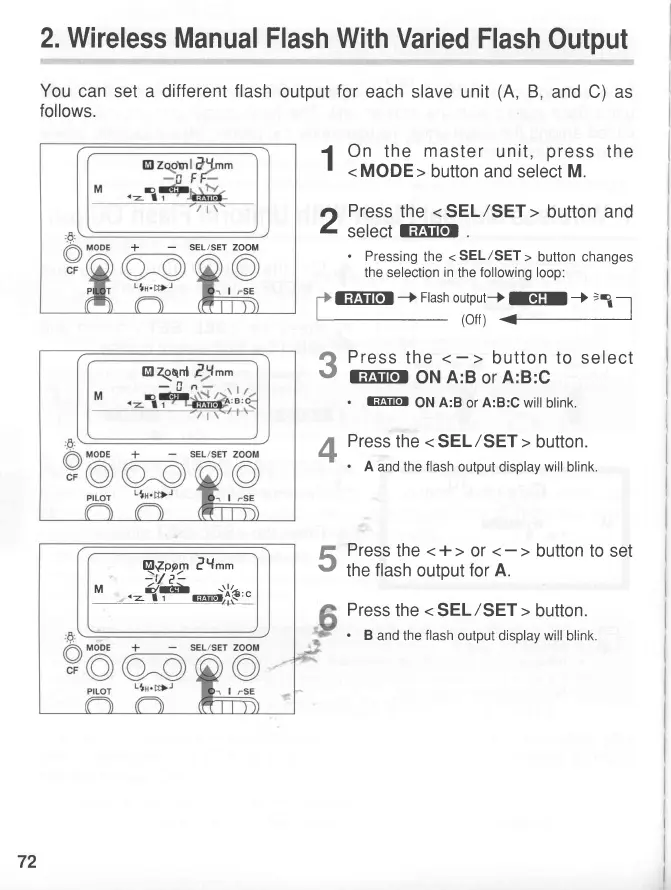
2. Wireless
Manual Flash
With Varied
Flash
Output
You
can set a different flash
output
for
each slave unit
(A,
B,
and C) as
follows.
1
On
the
master
unit,
press
the
ri
Press
the
< SEL/SET>
button and
Z
Setecr
liFiifor
.
Pressing
the
<
SEL/SET
>
button
changes
the selection
in
the
following
loop:
GFFJfdr
-*
Flash
output*
III
J
=-r
_--,
(off)
+
Press
the
lEFSrrOr
ON
A:B
or
A:B:C
.
l:E5ftil
ON
A:B
or
A:B:C
will
blink.
Press
the
<
SEL/SET >
button.
.
A
and the
flash
output display
will
blink.
Press
the
<+>
or
the
flash
output
for A.
Press
the
<
SEL/SET
>
button.
.
B
and the
flash
output
displa;t,wil! blink.
3
4
5
+
SEL/SET ZOOM
El
aqonl
-0
Qf,ogl
?Y''
"
'-{#il.*,.;.{,e'"
72
www.orphancameras.com

Related product manuals