EasyManua.ls Logo

Canon 550ex - Page 24

Canon 550ex
49 pages
Print Icon
To Next Page IconTo Next Page
To Previous Page IconTo Previous Page
Loading...
Wireless Manual Flash With Varied Flash
Output
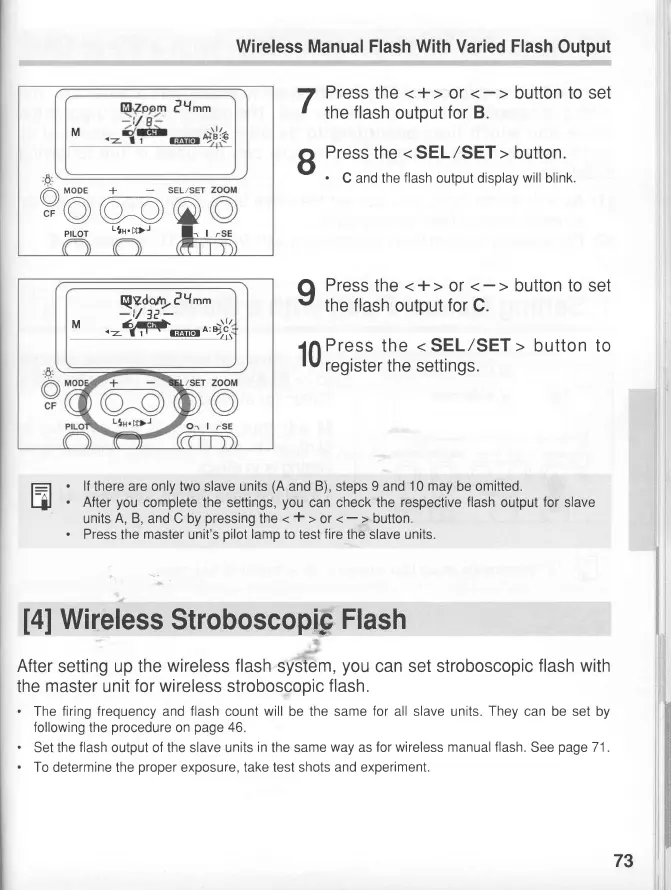
7
Press
the
<+>
or
t
the
flash
output
for B.
R
Press
the
<SEL/SET> button.
v
.
C and the
flash
output display
will
blink
q Press
the
<+>
or
.'
the
flash
output
for
C.
1n
Press
the
<
SEL/SET
>
button to
rv
register
the settrngs.
l=l
.
lf
there are only two slave units
(A
and
B),
steps 9 and
10 may
be omitted.
tjl
.
After
you
complete the settings,
you
can check the
respective flash
output
for
slave
units
A, B,
and C by
pressing
the
<
+
>
or
<-
>
button.
.
Press
the
master
unit's
pilot
lamp
to test
fire
the slave units.
t4]
Wireless
Stroboscopip
Flash
After
setting up the
wireless flash
system,
you
can
the
master
unit
for wireless
stroboscopic
flash.
.
The firing frequency
and
flash
count
will
be the same
for
all
following
the
procedure
on
page
46
.
Set the
flash
output of the slave units
in
the same
way
as
for wireless manual flash.
See
page
71 .
.
To
determine the
proper
exposure,
take test shots and experiment.
set stroboscopic
flash with
slave units
They
can be set by
/Ytt
M
die
GEtil'T
/A\
MODE
+
SEL,SET
V/A
/A---A
.r
v \1,=9 $f
pfLOT
--cn'zD-
I=,
I
q$q4r.lYmm
-t/
lP-
M
.-6F-r..'o,D1i
73

Related product manuals