EasyManua.ls Logo

Canon 550ex - Manual Flash Mode

Canon 550ex
49 pages
Print Icon
To Next Page IconTo Next Page
To Previous Page IconTo Previous Page
Loading...
'
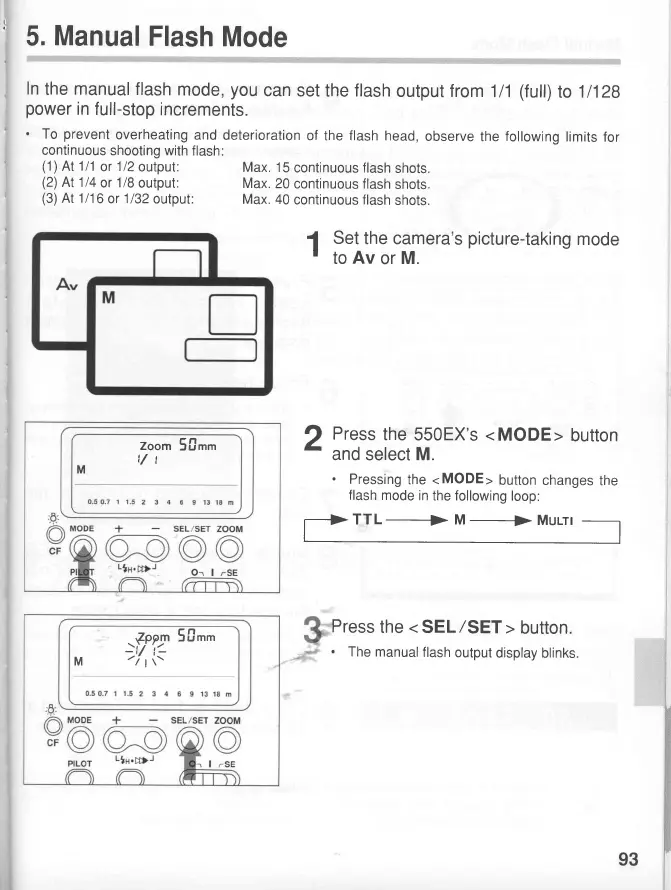
5.
Manual
Flash
Mode
ln
the
manual
flash
mode,
you
can
set
the
flash
output from
111
(full)
to
1
1128
power
in
full-stop
increments.
'
To
prevent
overheating
and deterioration
of
the
flash
head,
observe
the
following
limits
for
continuous
shooting with
flash:
(1)
At 111
or
1/2
output:
Max.
15
continuous flash
shots.
(2)
At 114
or
1/8
output:
Max.
20
continuous flash
shots
(3)
At 1116
or
1/32
output:
Max.
40
continuous flash
shots.
1,:tl$:,tftllt'u's
picture-takins
mode
2
Press
the
550EX's <
MODE
>
button
r
and
select
M.
'
Pressing
the <MODE>
button
changes
the
flash
mode
in
the following
loop:
TTL
_+
lvl
_+
lvlurrl
Press
the < SEL/SET
>
button.
.
The
manual
flash
output
display blinks.
Zoom
5firt
,/t
M
.ffe1
50"
-|t
i-
M
-/lt-
93

Related product manuals