EasyManua.ls Logo

Canon 550ex - Page 45

Canon 550ex
49 pages
Print Icon
To Next Page IconTo Next Page
To Previous Page IconTo Previous Page
Loading...
Manual
Flash Mode
a
.-f,PPI
50tt
_,/
1_
M
-zl\-
A
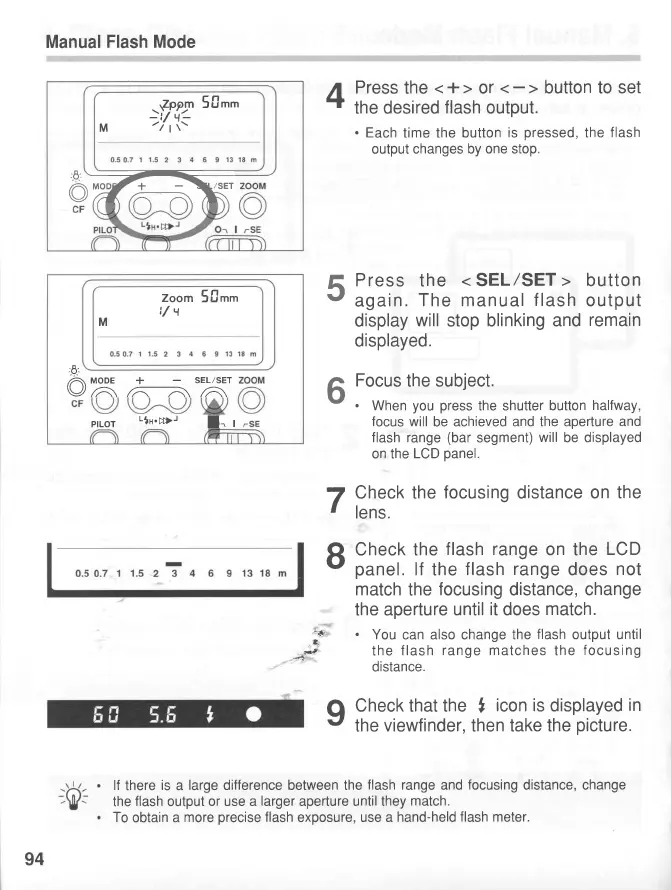
Press
the
<+>
or
T
the desired
flash
output.
.
Each
time the button
is
pressed,
the
flash
output changes by
one stop.
Press
the
<
SEL/SET
>
button
again.
The manual
flash
output
display
will
stop
blinking and
remain
displayed.
Focus
the subject.
.
When
you press
the shutter button
halfway,
focus will
be achieved
and the aperture and
flash range
(bar
segment)
will
be displayed
on the
LCD
panel.
7
Check the
focusing
distance
on the
r
lens.
R
Check the
flash range
on
the
LCD
v
panel.
lf
the
flash
range
does
not
match
the
focusing
distance, change
the aperture
until
it
does
match.
;*
'
You
can also change the
flash
output until
F
the
flash
range matches
the
focusing
'
distance.
q
Check that the
,
icon is
displayed
in
r'
the
viewfinder,
then take
the
picture.
lf
there
is
a
large
difference between the
flash
range and
focusing
distance, change
the
flash
output
or use a
larger
aperture until they
match.
To
obtain
a
more
precise
flash
exposure,
use a
hand-held
flash meter.
5
6
Zoom
5firt
t/t
M
+
A\
MODE
+
SEL/SET
\/A\ffi
pfLor
-|n.;_D-
l=,
r
94
www.orphancameras.com

Related product manuals