EasyManua.ls Logo

Canon 550ex - Page 29

Canon 550ex
49 pages
Print Icon
To Next Page IconTo Next Page
To Previous Page IconTo Previous Page
Loading...
J,
Using,flash
in
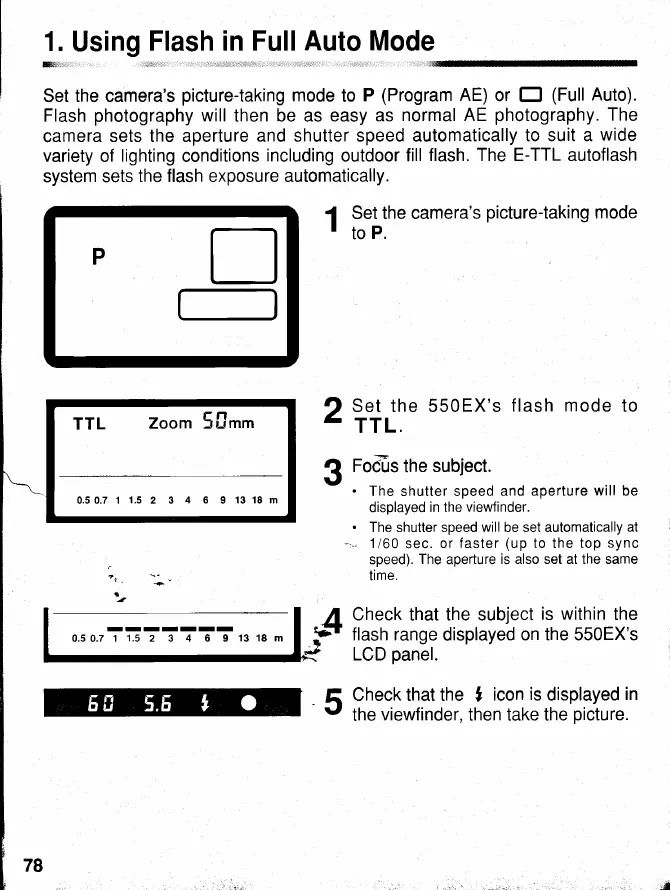
Set the camera's
picture-taking
mode
to
P
(Program
AE)
or
E
(Full
Auto).
Flash
photography
will
then be as easy
as
normal AE
photography.
The
camera
sets the aperture and
shutter speed automatically
to suit a
wide
variety of
lighting
conditions
including
outdoor
fill
flash. The E-TTL autoflash
system sets
the flash exposure automatically.
1
Ltiln.
camera's
picturetaking
mode
Full
Auto Mode
I
TTL
Zoom 5[.rn
0.50.7 1
1.5
2 3
4
6 9
13 18 m
Set the 550EX's
flash
mode
to
TTL.
Fo&s
the
subject.
.
The shutter speed
and aperture will be
displayed
in the
viewfinder.
.
The shutter speed
will
be set automatically
at
."
1/60
sec.
or f aster
(up
to the top
sync
speed).
The
aperture
is also set
at
the same
time.
Check
that
the subject
is within
the
flash range
displayed
on the 550EX's
LCD
panel.
Check that the
I
icon
is
displayed
in
the
viewfinder,
then take the
picture.
2
3
5
tl
t-l
P
www.orphancameras.com