EasyManua.ls Logo

Canon 550ex - Page 47

Canon 550ex
49 pages
Print Icon
To Next Page IconTo Next Page
To Previous Page IconTo Previous Page
Loading...
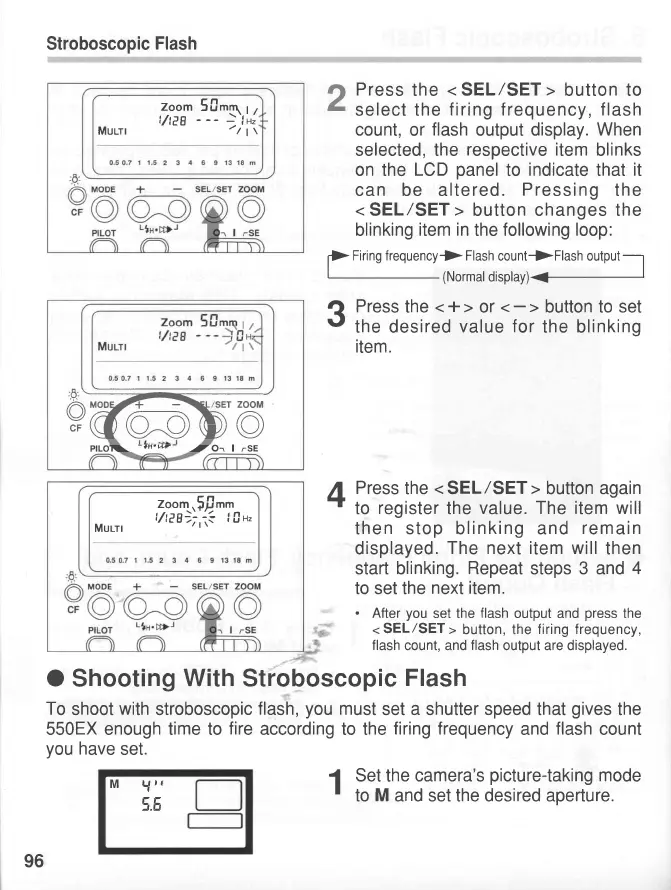
Stroboscopic
Flash
Press
the
<
SEL/SET
>
button to
select the
firing
frequency,
flash
count,
or
flash
output
display.
When
selected, the
respective item
blinks
on the
LCD
panel
to
indicate
that
it
can be altered.
Pressing
the
< SEL/SET >
button changes the
blinking
item in
the
following loop:
f>
Fir ns rrequency
f_ffi
: llil,):r,.,,
.,5
?
Press
the
<+>
or
t'
the desired
value
for
the blinking
item.
A
Press
the
<
SEL/SET
>
button
again
+
to
register
the
value. The item will
then stop blinking and
remain
displayed.
The next item will
then
start blinking.
Repeat
steps 3 and
4
to set the
next item.
.
After
you
set the
flash
output and
press
the
<
SEL/SET
>
button, the
f iring f requency,
flash
count, and
flash
output are displayed.
O
Shooting
With
Stroboscopic
Flash
To
shoot
with
stroboscopic
flash,you must
set a shutter speed that
gives
the
550EX enough time to
fire
according to the
firing frequency
and
flash
count
you
have
set.
2
Zoom
50ttq
I
,
t/,eg
- --
---
f
H,
Mulrl
'/
|
\
o
Y@rooDo
pllOl\
-.rt.vtr-
-tO-.
|
.-SE
Zoom,5!rnt
t/teg_)i,:r?
|
0u,
Murrr
M
Y"
\.8
96
1
Set the
camera's
picture-taking
mode
'
to
M
and set the desired aperture.
www.orphancameras.com

Related product manuals