EasyManua.ls Logo

Canon 550ex - Page 49

Canon 550ex
49 pages
Print Icon
To Previous Page IconTo Previous Page
Loading...
7,*S*ec
o
nd
-
C
ultai
n*
S_y_*
S
o
n izati
o
n
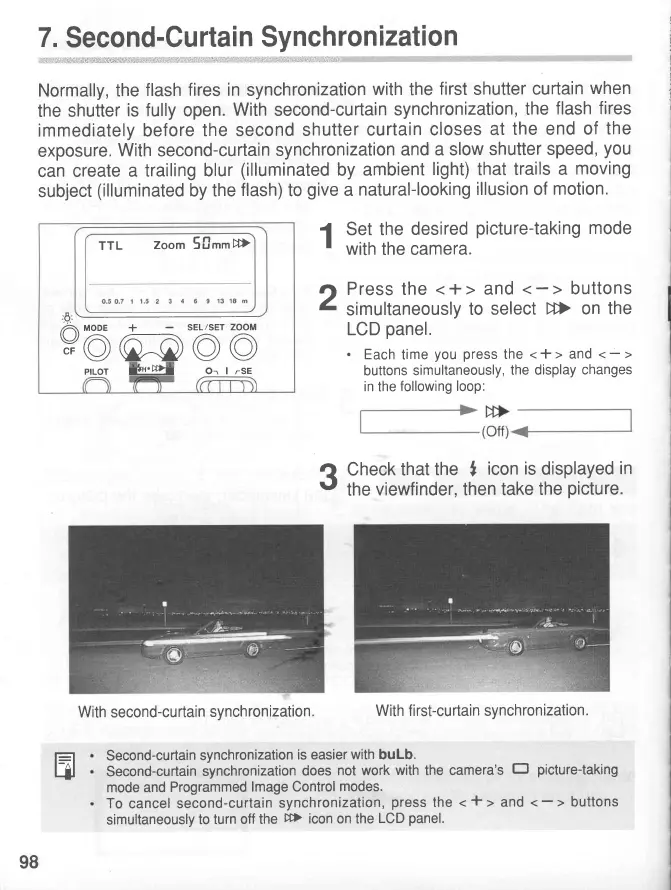
Normally, the
flash
fires in
synchronization
with
the
first
shutter
curtain
when
the shutter
is fully
open.
With
second-curtain
synchronization,
the
flash
fires
immediately before
the
second
shutter
curtain
closes
at
the end
of
the
exposure.
With
second-curtain
synchronization
and
a slow
shutter
speed,
you
can
create
a trailing
blur
(illuminated
by ambient
light)
that
trails a
moving
subject
(illuminated
by the
flash)
to
give
a
natural-looking
illusion
of
motion.
1
Set
the
desired
picture-taking
mode
'
with
the camera.
tl
Press the
<+>
and
I
simultaneously
to
select D>
on
the
LCD
panel.
.
Each
time
you press
the
<
+ >
and
<
-
>
buttons
simultaneously,
the display
changes
in
the
following loop:
e
Check
that
the
,
icon
is
displayed
in
t'
the
viewfinder,
then
take
the
picture.
Second-curtain
synchronization
is easier
with
buLb.
Second-curtain
synchronization
does
not work
with
the camera's
Ef picture-taking
mode and
Programmed
lmage Control
modes.
Tocance]second-curtainsynchronization,preSSthe<t>and<>
simultaneously
to turn
off the
DD)
icon on the
LCD
panel.
E
-A-
/71
MqDE
+
SEL/SET
ZOOM
v@)
@@@
TTL
Zoom 50mm
DD)
pfLOT
J.tfvLT-
Or I
rSE
With second-curtain
synchronization.
With first-curtain synchronization.
98
www.orphancameras.com

Related product manuals