EasyManua.ls Logo

Canon 550ex - Page 5

Canon 550ex
49 pages
Print Icon
To Next Page IconTo Next Page
To Previous Page IconTo Previous Page
Loading...
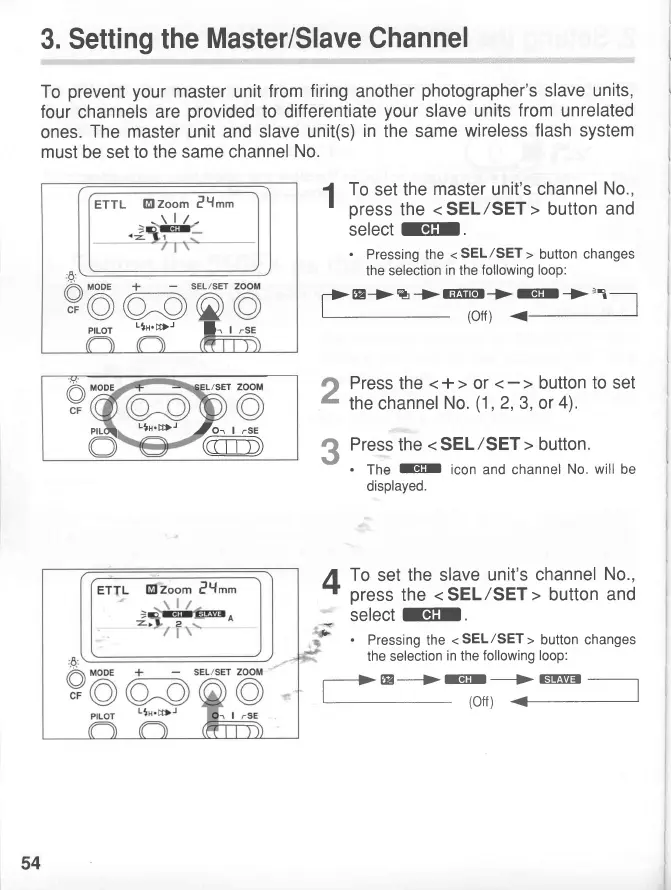
3. Setting
the
Master/Slave Channel
To
prevent your
master
unit
from
firing
another
photographer's
slave units,
four
channels
are
provided
to differentiate
your
slave units
from
unrelated
ones.
The master
unit
and slave
unit(s)
in
the same
wireless
flash system
must
be set
to the
same channel
No.
1
To
set
the
master
unit's
channel
No.,
'
press
the
<
SEL/SET
>
button
and
select
EIII
.
.
Pressing the
<
SEL/SET
>
button
changes
the
selection
in
the
following
loop:
f>
@+
%
+
rEEIrr.r
+
EIt
->
>-r
-l
(off
)
Press the
<+> or
the
channel
No.
(1,2,3,
or
4).
Press
the
<
SEL/SET
>
button.
.
The
IIt
icon and channel
No. will
be
displayed.
A
To
set
the slave
unit's
channel
No.,
-?
press
the
<
SEL
/SET
>
button and
*_
select
EIt.
3-
.
Pressing
the
<
SEL/SET
>
button changes
the selection
in
the
following loop:
-+@--+
Iellr-*
rsrtn:r
-
,
-
I:lr.I
--
GEIirEl
(off)
+
2
3
ETTL
El
zoom PY.t
-r
lz-
.R
/A
MODE
+
SEL/SET
v@o:o@
prLor
-in.D-
l_,
I
o
CF
MODE
/sET
ZOOM
5
-ln.DD)-
Jo^
|
rsE
54
www.orphancameras.com

Related product manuals