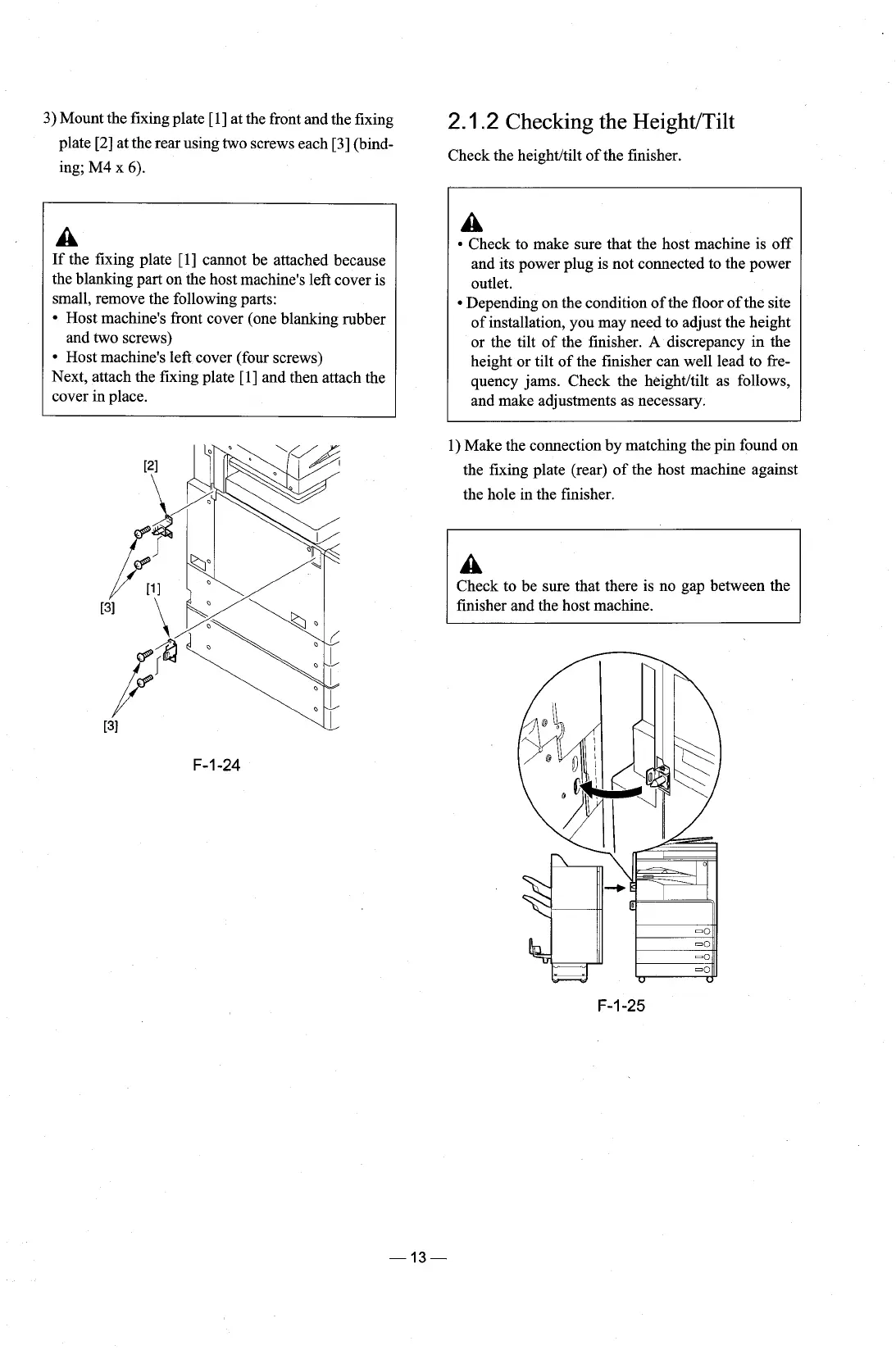
3) Mount the fixing plate [I] at the front and the fixing
2.1
.2
Checking the HeightITilt
plate
[2]
at the rear using two screws each [3] (bind-
Check the heightltilt of the finisher.
ing;
M4
x
6).
A
If the fixing plate
[I]
cannot be attached because
the blanking part on the host machine's left cover is
small, remove the following parts:
Host machine's front cover (one blanking rubber
and two screws)
Host machine's left cover (four screws)
Next, attach the fixing plate
[l] and then attach the
cover in place.
A
Check to make sure that the host machine is off
and its power plug is not connected to the power
outlet.
Depending on the condition of the floor of the site
of installation, you may need to adjust the height
or the tilt of the finisher.
A
discrepancy in the
height or tilt of the finisher can well lead to fre-
quency jams. Check the
heightltilt as follows,
and make adjustments as necessary.
1) Make the connection by matching the pin found on
the fixing plate (rear) of the host machine against
the hole in the finisher.
Check to be sure that there is no gap between the
finisher and the host machine.











 To Next Page