7
Printing on CD-Rs/DVD-Rs - Windows
This section explains how to use CD-LabelPrint to print directly on 12 cm CD-Rs and DVD-Rs. Refer to the
CD-LabelPrint’s manual for more information about this procedure.
To access the manual from the
Start
menu, click
All Programs
(or
Programs
for Windows Me/Windows
2000/Windows 98),
CD-LabelPrint
, and select
Manual
.
Importing the image to print on the CD-R/DVD-R
1
11
1
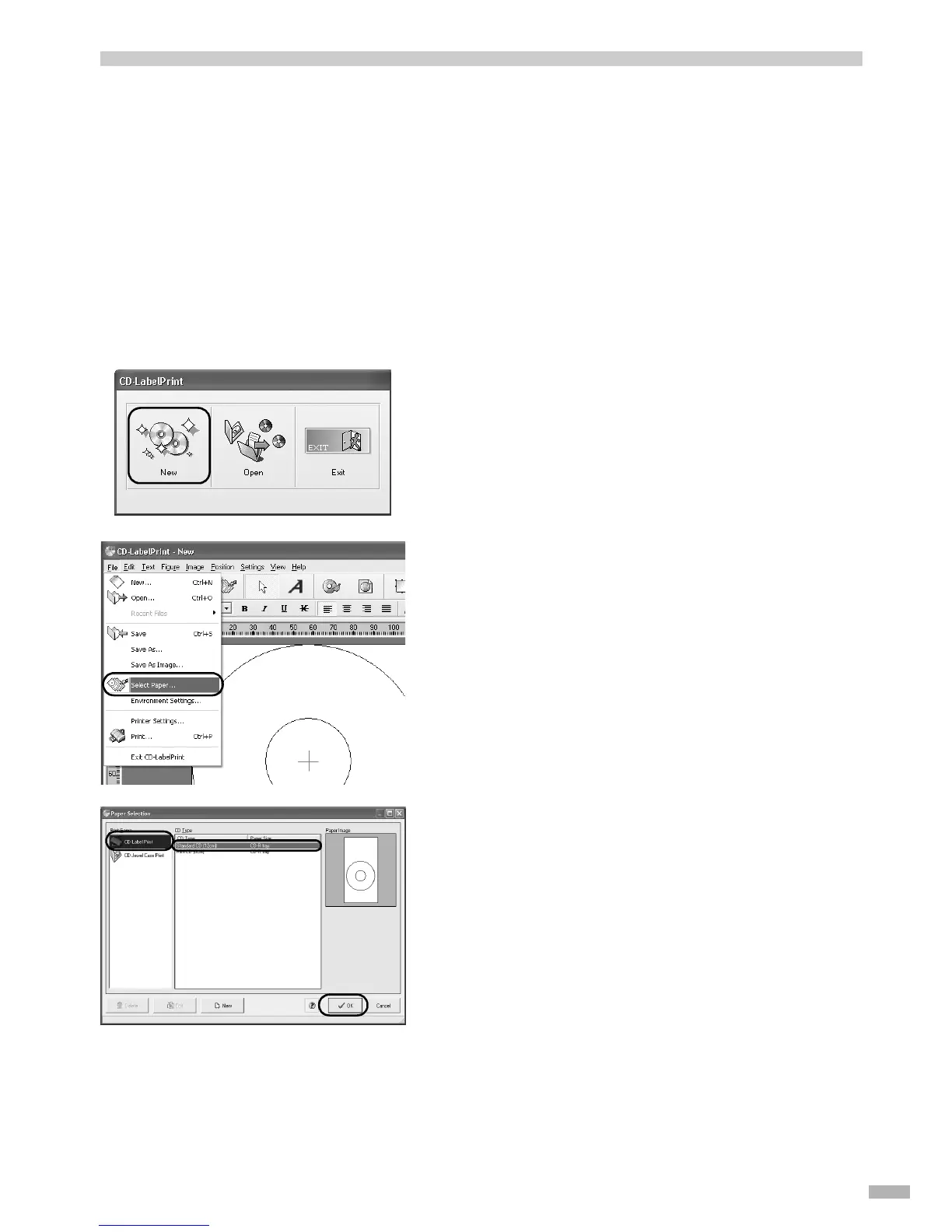
Select All Programs (or Program),
CD-LabelPrint, and then CD-
LabelPrint to start CD-LabelPrint.
2
22
2
Click New on the CD-LabelPrint menu.
3
33
3
Open the File menu, and select Select
Paper.
The
Paper Selection
dialog box appears.
4
44
4
Select CD-LabelPrint from Paper
Style, and then select Standard CD
(12cm) from CD Type.
5
55
5
Click OK.
6
66
6
Make any changes to the label image.


 To Next Page