42
J Displaying by Entering an IP Address
If the terminal does not support NFC, display the operation screen by entering an IP
address into the Web browser.
1
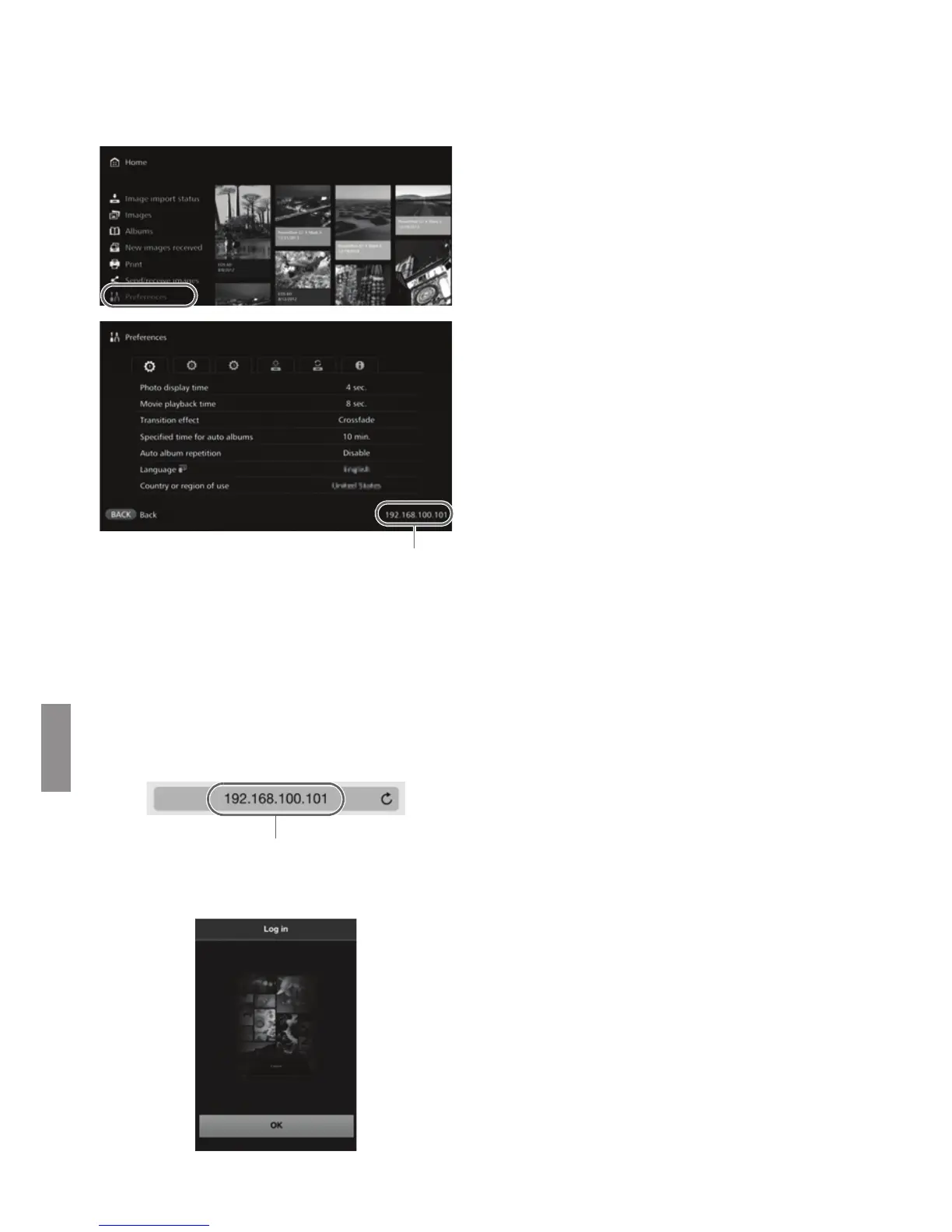
Select [Preferences] in
Connect Station.
Select [Preferences] on the
Home screen.
2
Check the IP address.
The number displayed on the
lower right of the [Preferences]
screen is the IP address.
3
Operate the terminal to
connect to the access point,
router, etc. to which Connect
Station is connected.
4
Start the Web browser on the
terminal.
5
Enter the IP address into the
terminal.
Enter the IP address you checked
in step 2 in the address field of
the Web browser.
6
Operate the terminal to log in
to Connect Station.
On the terminal screen, select
[OK].
X The album list screen will appear
(p.43).
Example of an IP address


 To Next Page