45
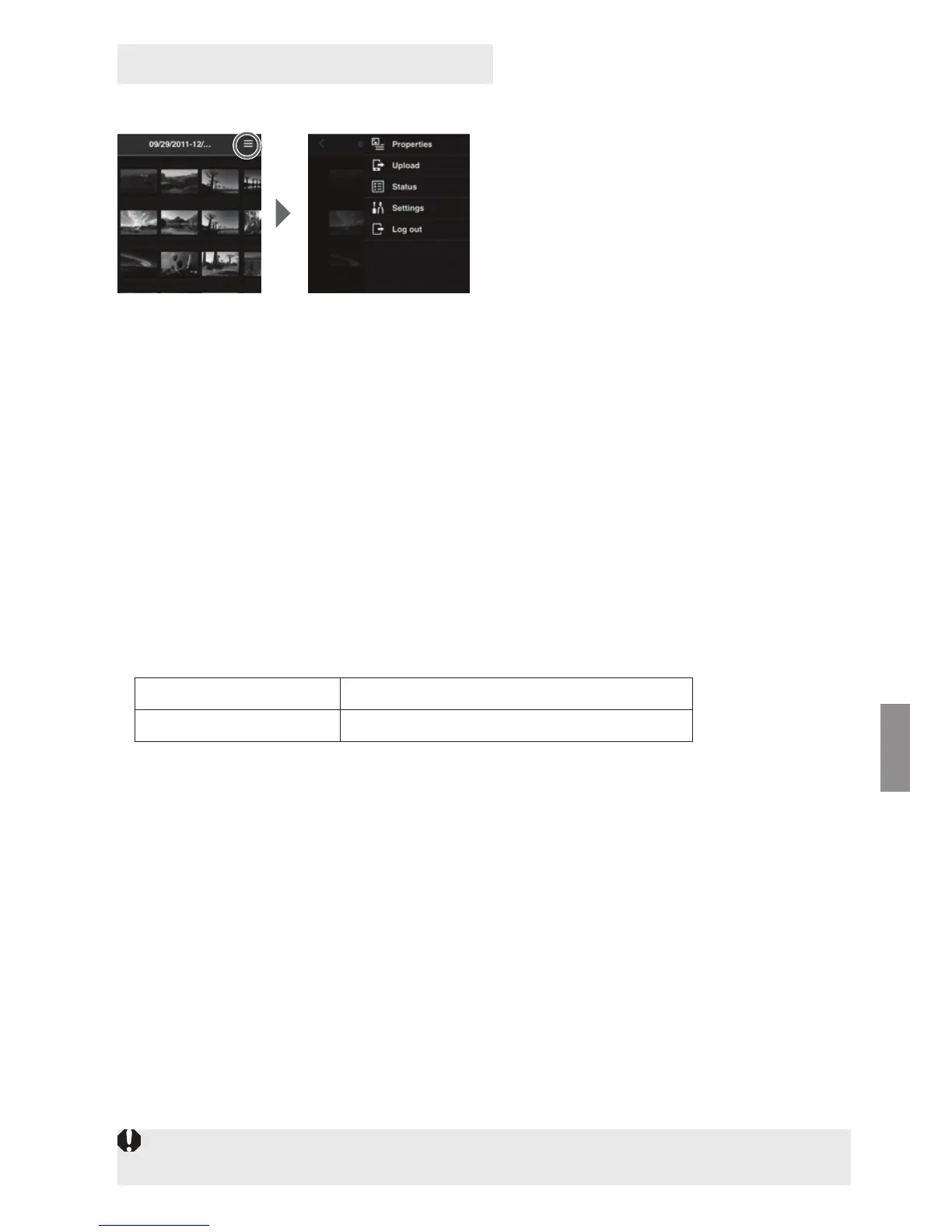
Upload images or make various settings from the menu screen of the terminal.
Selecting [v] on the upper right
of the screen displays the menu
screen.
J Properties
Edit the titles and comments of albums and images.
In the thumbnail display, you can edit the titles and comments of albums.
In the single-image display, you can edit the comment of the image.
J Upload
Import still photos on a terminal to Connect Station. For information on the operation
procedure, see “Uploading Still Photos from the Terminal” (p.44).
J Status
Check the operation status of Connect Station, such as the remaining capacity of the
hard disk and the image importing status.
J Settings
Specify the slide show playback settings.
J Log out
Return to the login screen after disconnecting the connection between Connect
Station and the terminal.
Menu Screen of the Terminal
Slide show Set the image transition time.
Transition effect Set the image transition method.
Only single-byte upper- and lower-case letters from A to Z, underscores (_), hyphens (-),
colons (:), slashes (/), spaces, and numerals can be entered in [Properties].


 To Next Page