47
J Creating a New Account
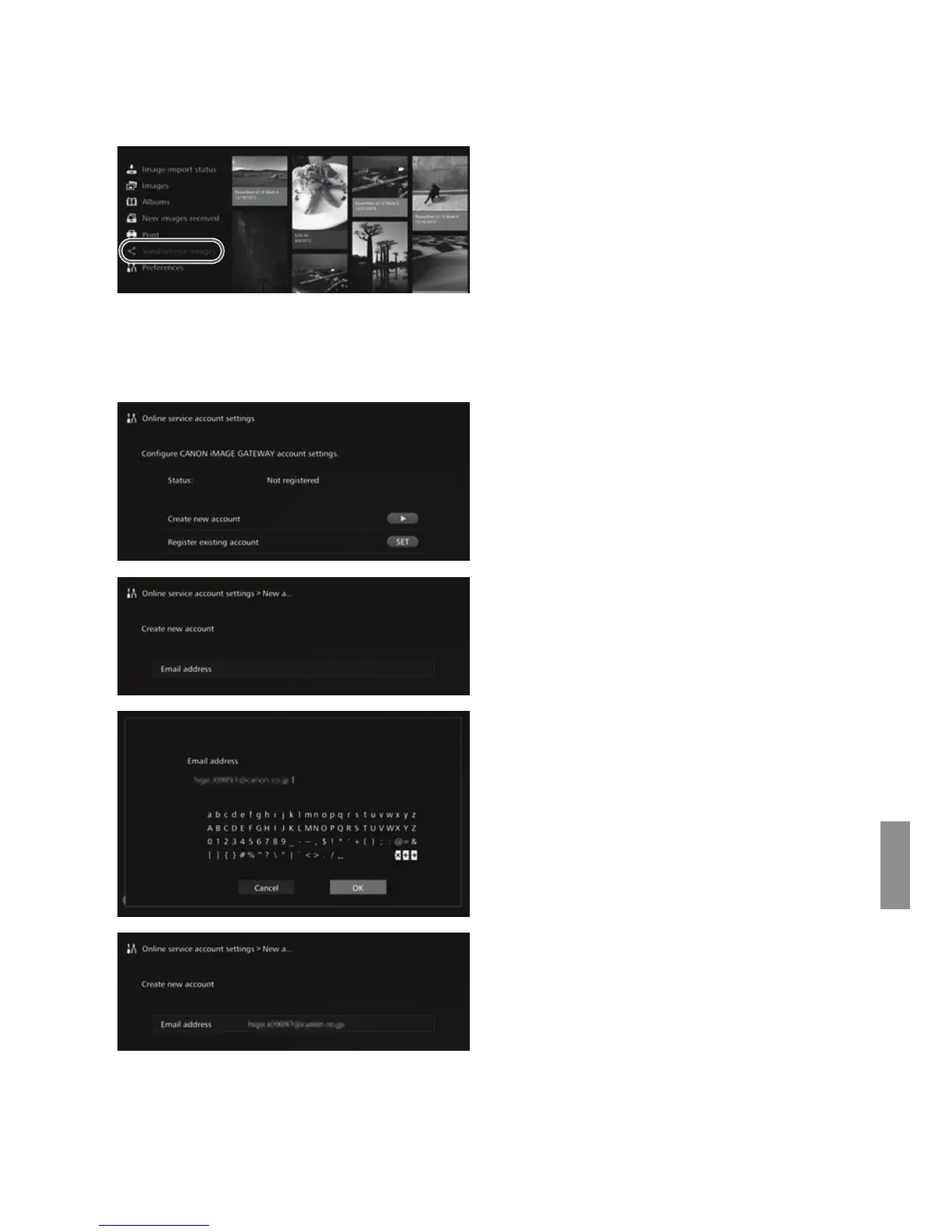
Newly sign up as a CANON iMAGE GATEWAY member, and set up an account on
Connect Station.
1
Select [Send/receive images].
When setting up an account for
the first time, select [Send/
receive images] on the Home
screen.
If you have set up an account with
Connect Station, select
[Preferences] 9 [c] tab 9
[Online service account
settings].
2
Press the <g> key.
Press the <g> key, then select
[Create new account].
3
Press <S>.
X A keyboard screen will appear.
4
Enter the Email address.
Enter the Email address for your
computer, smartphone, etc.
Select a character with the <T>
keys, then press <S> to enter
it.
When you are finished, select
[OK].
5
Press <M>.
X An Email will be sent to the
registered Email address from
CANON iMAGE GATEWAY.


 To Next Page