51
Approving the received approval request
Perform the approval operation on the Connect Station unit that has received an
approval request.
5
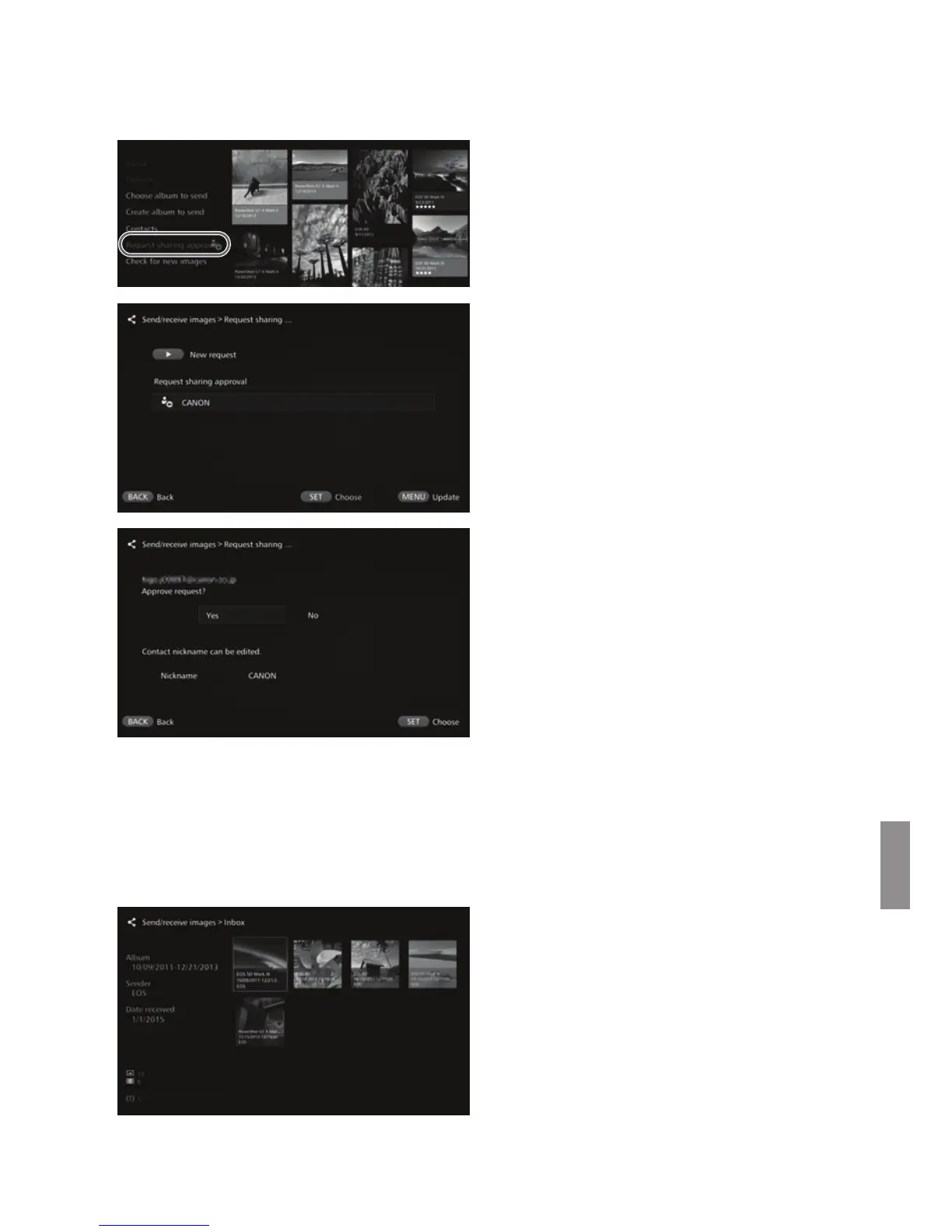
Select [Request sharing
approval].
When an approval request has
been received, [Request sharing
approval] is displayed with [w].
6
Select a received approval
request.
Select the request to be approved
from the list, then press <S>.
7
Select [Yes].
When you select [Yes] and press
<S>, the registration of transfer
will be completed.
If necessary, you can also change
the nickname.
When the registration of the contact is complete, albums can be transferred with
the registered contact. The registered Email addresses are added to [Contacts]
on both Connect Station units and can be selected when sending images.
J Inbox/Outbox
A list of received or sent albums is displayed.
When you select an album using
the <T> keys, you can check the
album name, number of images,
sender and recipient, date of
transfer, album comments, etc.
When you select an album and
press <S>, the album viewing
screen appears, allowing you to
view the content of the album.


 To Next Page