58 • External Connections
External Connections
This chapter explains step-by-step how to connect your camcorder to
an external device such as a TV or VCR.
Connecting to a TV or VCR
Connection Diagrams
Turn off all the devices when making the connection and refer also to the instruction
manual of the connected device.
Connecting to a TV or VCR
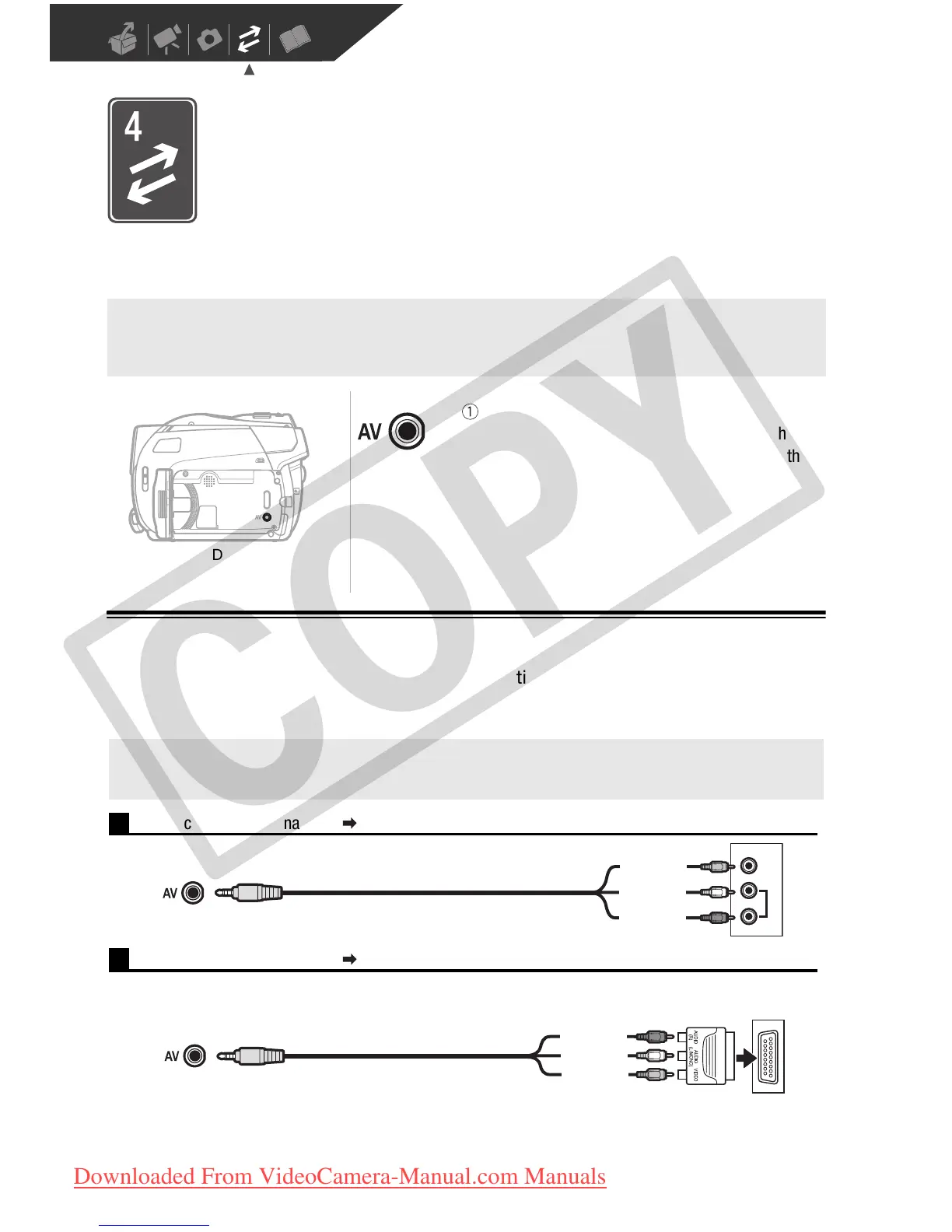
AV Terminal
Sound from the built-in speaker will be muted while
the STV-250N Stereo Video Cable is connected to the
camcorder.
Open the LCD panel to
access.
Terminal on the
camcorder
Connecting cable
Terminal on the
connected device
VIDEO
AUDIO
R
L
1
Output connection (signal flow ) to a TV or VCR with AV terminals.
STV-250N Stereo Video Cable
(supplied)
Yellow
White
Red
2
Output connection (signal flow ) to a TV or VCR with SCART terminal.
First, connect a SCART adapter to the SCART terminal on the TV or VCR and then connect the STV-250N
Stereo Video Cable to the adapter.
STV-250N Stereo Video Cable
(supplied)
Yellow
White
Red
SCART adapter
(commercially available)
COPY
Downloaded From VideoCamera-Manual.com Manuals



 To Next Page