12
Installing the Software
◀
Click!
◀
Select
▼
◀
Click!
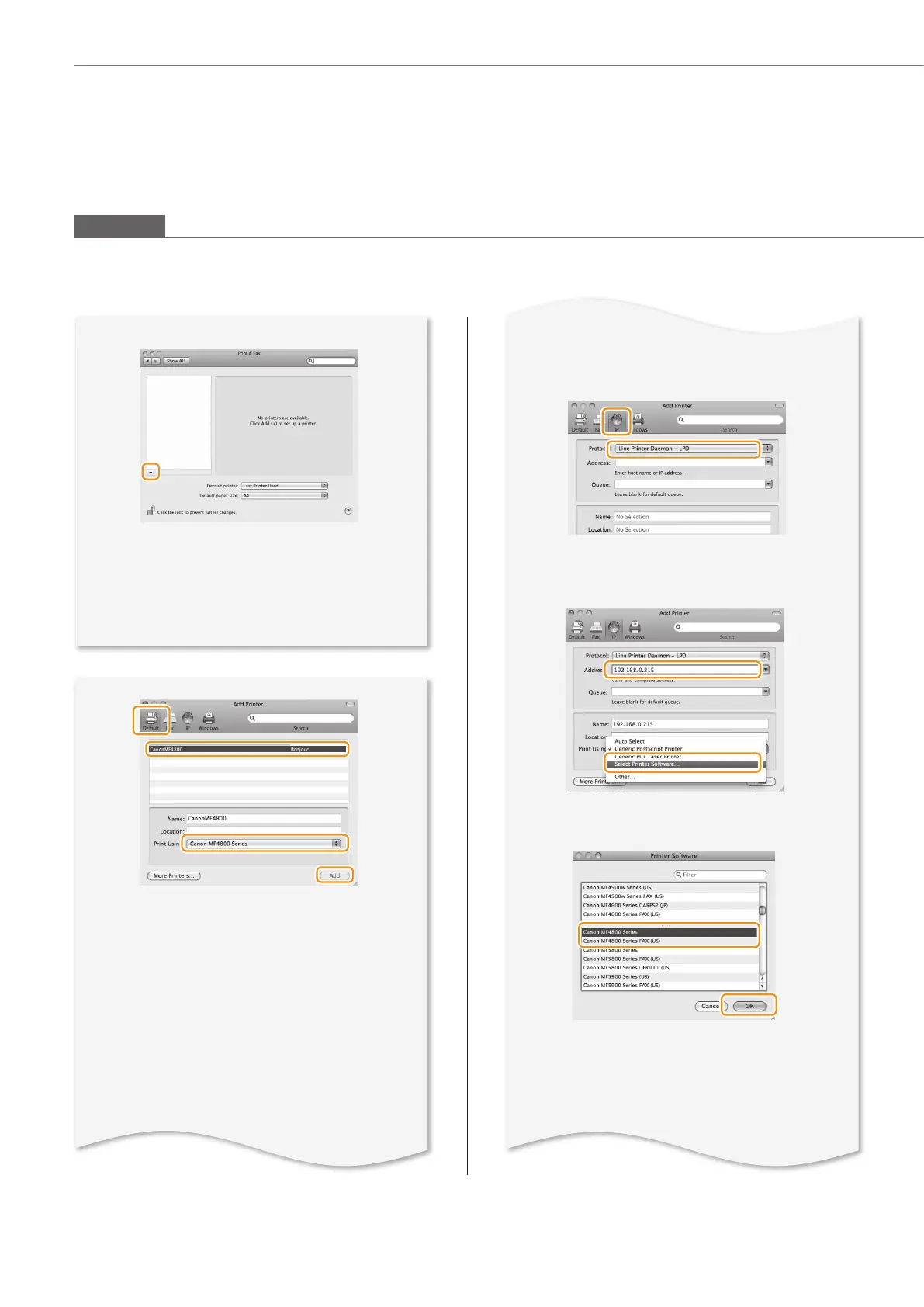
• [IPP (Internet Printing Protocol)] is not supported.
Select a printer name for which [Bonjour] is
displayed in the [Kind] or [Connection] column.
If you are using Mac OS X 10.5.x, select the
corresponding driver fr
om [Print Using].
• An IP address is automatically confi gur
ed
by the Bonjour function.
If there is not the
Bonjour function or you want to set the
IP address manually, see “Setting the IP
Address” in the e-Manual.
Connecting with the manual setting
◀
Select
◀
Select
◀
Click
◀
Click!
◀
Enter
◀
Select
◀
Click!
▼
▼
▼
◀
Select
• If you are using Mac OS X 10.5.8, click [+],
select [CanonMF4800] or [CanonMF4700]
from the dialog box displayed, and then
proceed to next step..
Macintosh










 To Next Page