9
Setting the Wireless LAN
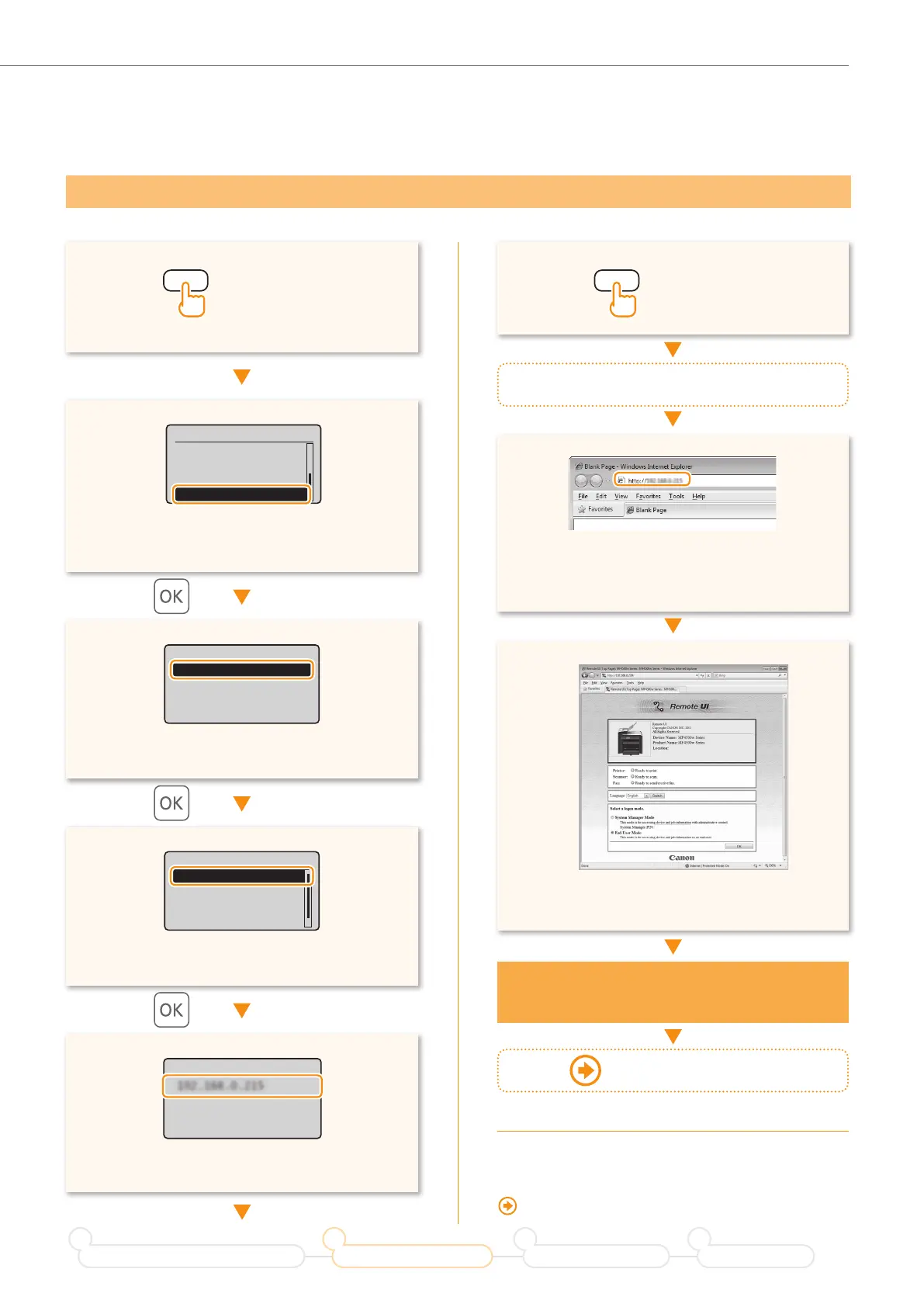
• Press [▲] or [▼] to highlight <Network
Information>.
• Enter [http://<IP address that you have written
down in step
>/] in the address
fi eld, and
then press [Enter] on your keyboard.
• Check that the screen of the Remote UI is
displayed.
• Press [▲] or [▼] to highlight <IPv4>.
(Status Monitor/Cancel) (Status Monitor/Cancel)
Status Monitor/Cancel
Coy Job Status
Fax Job Status/Hist
...
Print Job Status
Network Information
Network Information
IPv4
IPv6
Wireless LAN Informa
...
IP Address
192.168.0.215
Start a web browser from the computer
Connection is completed
when the screen is displayed.
When the screen is not displayed
correctly:
“The Remote UI is not displayed.” (P.17)
Checking that the Wireless LAN Setting is Completed
• Press [▲] or [▼] to highlight <IP Address>.
IPv4
IP Address
Subnet Mask
Gateway Address
Host Name
• Take note of the IP address.
Proceed to P.10
Prepare for Wireless LAN Connection
1
Setting the Wireless LAN
2
Installing the Software
3
Troubleshooting
4











 To Next Page