7
Specifying Initial Settings for the Fax Functions
and Connecting the Telephone Cable
1.
Register the fax number and unit name.
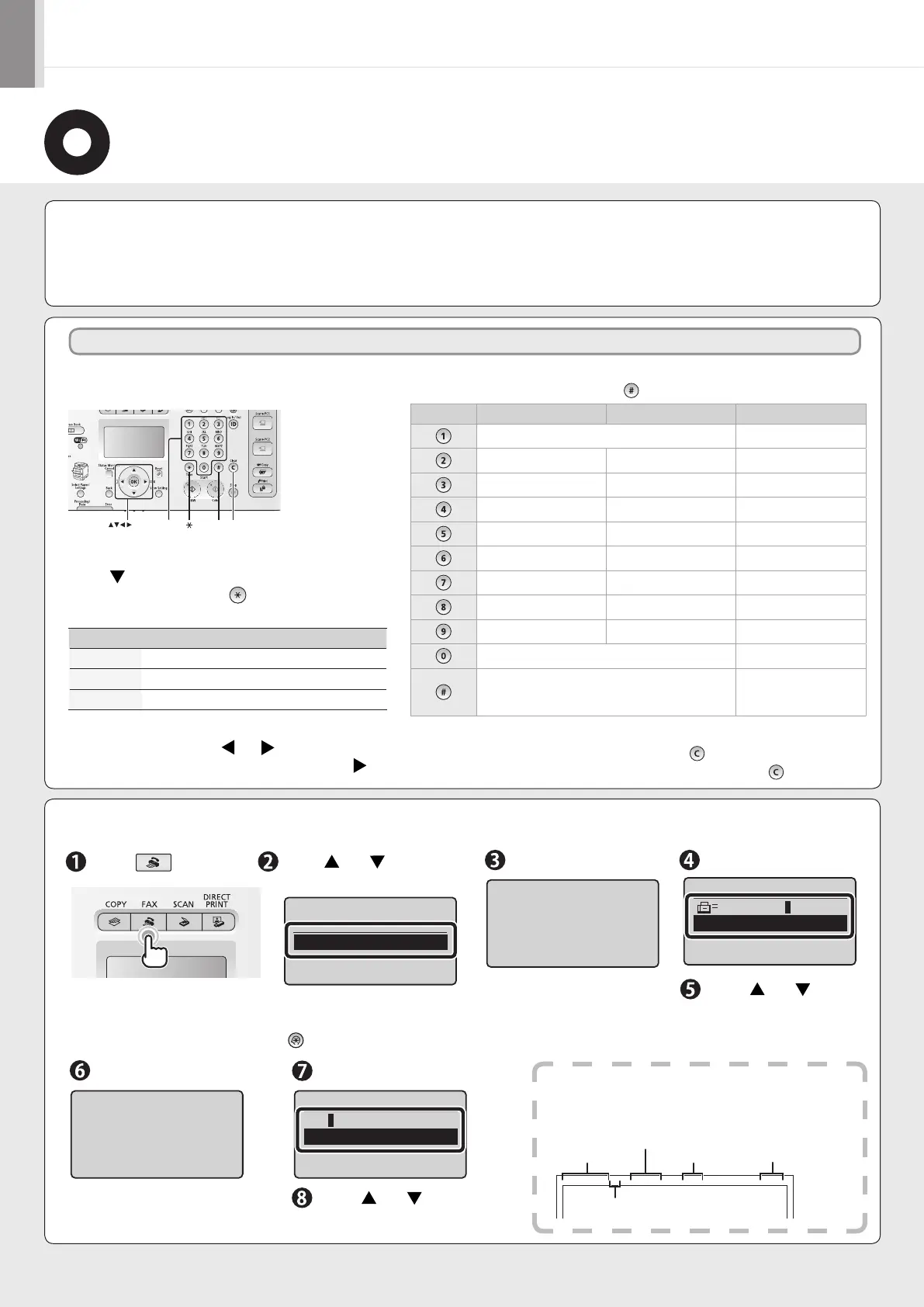
Enter information (text, symbols, and numbers)
using the following keys.
# C
Numeric
keys
OK
Entering text, symbols, and numbers
Enter using the numeric keys or [
] (SYMBOLS).
Key Entry mode: <A> Entry mode: <a> Entry mode: <12>
@ . - _ / 1
ABC abc 2
DEF def 3
GHI ghi 4
JKL jkl 5
MNO mno 6
PQRS pqrs 7
TUV tuv 8
WXYZ wxyz 9
(Not available) 0
(space) @ . / - _ ! ? & $ % # ( ) [ ]{ } < > * + = "
, ; : ' ^ ` | \ ˜
(Not available)
Deleting text, symbols, numbers
To delete text, numbers, or symbols, press [
] (Clear).
To delete all text, numbers, or symbols, press and hold [
] (Clear).
Press [
].
Press [ ] or [ ] to select,
and then press [OK].
Display “Fax Setup Guide” with the following operations to perform
the settings or connections if selecting <Set up Later>.
[ ] (Menu) → <Fax Settings> → <Fax Setup Guide>.
Press [OK]. Enter.
Press [ ] or [ ] to select
<Apply>, and then press
[OK].
Press [OK].
Enter.
Press [ ] or [ ] to select
<Apply>, and then press [OK].
Entering Text
Changing the entry mode
Press [
] to select <Entry Mode>, and then press
[OK]. You can also press [ ] (Tone) to change
the entry mode.
Entry mode
Text that can be entered
<A>
Alphabet (capital letters) and symbols
<a>
Alphabet (small letters) and symbols
<12> Numbers
Moving the cursor (Entering a space)
Move the cursor by pressing [ ] or [ ]. To enter a space,
move the cursor to the end of the text, and then press [ ].
Perform Fax Setup?
Set up Now
Set up Later
Register the unit
telephone number for
this machine.
Register Unit Tel No.
031234567
<Apply>
+
Register unit name.
(Sender name,
company name, etc.)
Register Unit Name
ABC
<Apply>
Entry Mode: A
What happens with the unit name
Once the information has been registered, it is printed at the
top of each page that you are sending.
Sending Date/Time
Fax/Telephone Number
(FAX No.)
Page Number
Sender Name
(Unit Name)
Telephone Number
Mark
01/01 2011 02:07 PM FAX 123XXXXXXX CANON P.0001
Operate the machine following the on-screen instructions and perform the following settings and connection.
• Registering the fax number and unit name
• Setting the fax receive mode
• Connecting a telephone line
If you are using pulse dialing, change the line type after specifying the settings.













 To Next Page