8
2.
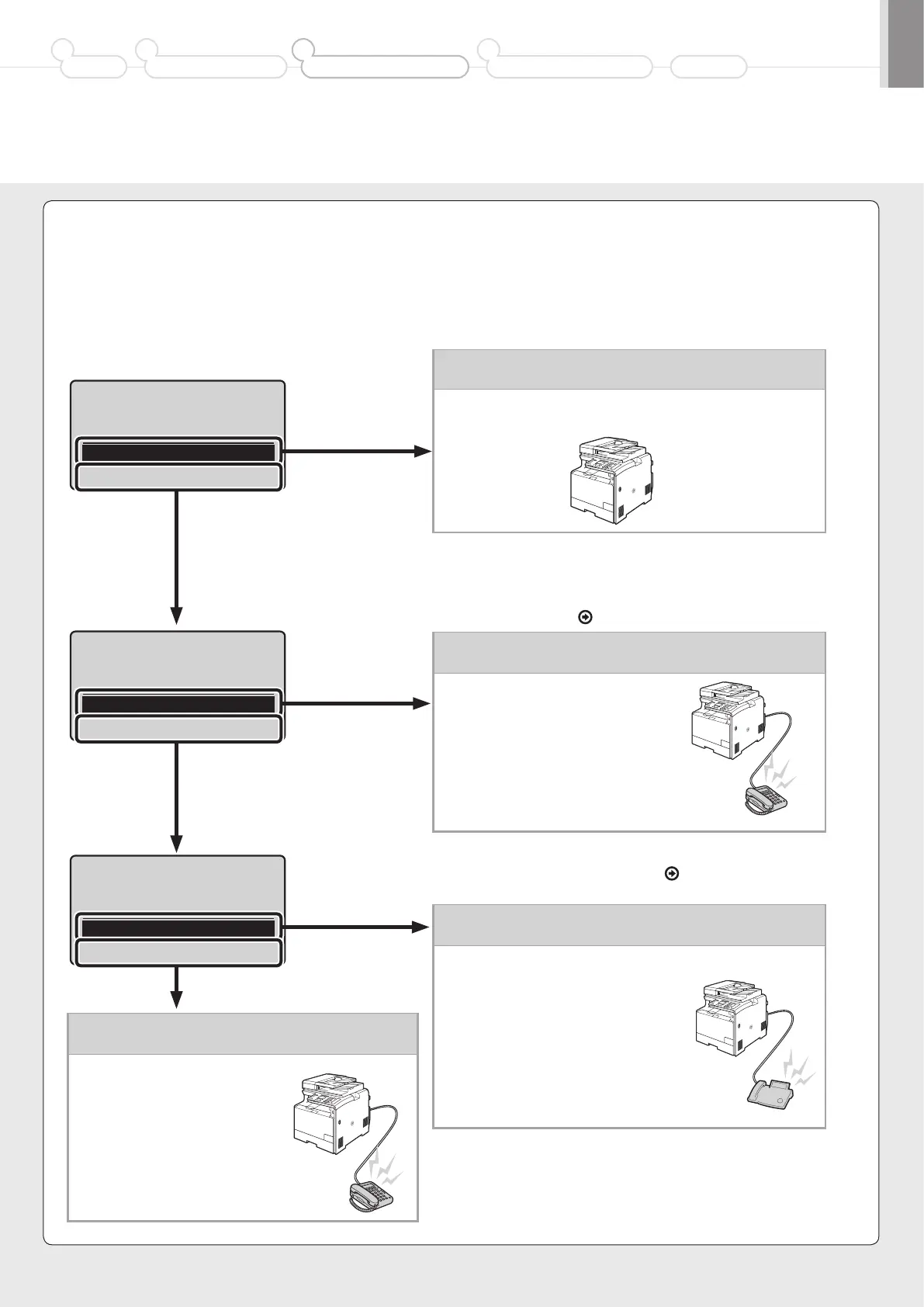
Select the fax receive mode.
The receive mode is set to <Auto>.
→ Proceed to Step 3.
• Receives a fax automatically.
• Does not use the telephone or optional handset.*
* If connecting with the telephone or optional handset in auto receive
mode, the incoming ring sounds when receiving a fax or telephone
call. You can answer the telephone while the incoming ring is
sounding. To configure so that the incoming ring does not sound, see
“Incoming Ring” in the
e-Manual.
Do you want to use
this machine for fax
only (no telephone)?
Yes
No
Do you want to auto-
receive faxes and
Yes
No
Do you want to use
an answering machine
to answer the phone?
Yes
No
The receive mode is set to <Fax/Tel Auto Switch>.
→ Proceed to Step 3.
• Receives a fax automatically.*
• Responds to a telephone call by
picking up the handset.
* An incoming ring sounds. To configure so that the incoming ring does
not sound, see “Incoming Ring” in the
e-Manual.
The receive mode is set to <Answering Machine>.
→ Proceed to Step 3.
• Receives a fax automatically.
• Responds to a telephone call with
the built-in answering machine.
• Rings when receiving a call or fax.
The receive mode is set to <Manual>.
→ Proceed to Step 3.
• Responds to both a telephone
call and fax with handset
pickup.
• Rings when receiving a call
or fax.
You can specify how the machine should operate for a fax call or telephone call.
By answering the prompts that appear on the display, the machine will be set to one of the following four operation modes.
<Auto><Fax/Tel Auto Switch><Answering Machine><Manual>
* You can set a receive mode other than the above manually depending on your country or region. For details on the setting procedure, see “Receiving Faxes” in the e-Manual.
Yes
Yes
Yes
No
No
No
Preface
1
Installing the Machine
2
Configuring and Connecting the Fax
3
Connecting to a Computer and
Installing the Drivers
4
Appendix













 To Next Page