imageFORMULA ScanFront 400 Service Guide
imageFORMULA ScanFront 400 Service Guide November 2016
Page 1
I. Product Overview
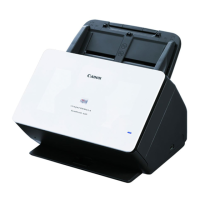
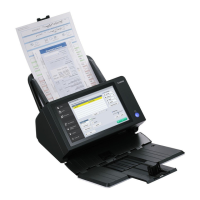
The Canon imageFORMULA ScanFront 400 is a compact network scanner with
a customizable Web Application mode. Scanned image data can be transferred
to a shared folder on a server PC or client PC on the same network as the
scanner, sent to a printer for printing, or delivered to a remote location via e-mail
or Internet fax service.
The imageFORMULA ScanFront 400 features the following:
• Scans documents in a range of sizes from business cards to A4/LTR size in
color, grayscale, and B&W (black-and-white) in speeds of up to 45 ppm
(pages-per-minute) using 1-sided LTR (letter-sized) paper, and up to 90 ipm
(images per minute) using 2-sided LTR paper at a resolution of 200 x 200 dpi
(dots per inch)
1
.
• Transfer to a variety of destinations via a network: Shared folders, FTP
Servers (excluding FTP servers that require firewall settings), E-mail
addresses and Fax (via an Internet fax service)
• Long Document Scanning (Automatically detects long document sizes)
• High Image Quality (Up to 600 dpi optical resolution)
• Supports saving image files to USB Memory
• Touch Panel Operation (10.1-inch TFT WSVGA (1024 x 600 dots) screen)
• Supports a Mouse and Keyboard (Optional)
• ScanFront Administration Tool to simultaneously manage multiple ScanFront
scanners on a network
• Job Buttons: Shared Address Book and Shared Job Button, My Address
Book and My Job Button
• Supports Directory Services
• Functional Restrictions
• Auto Size Detection and Auto Color Detection
• Folio Scanning
• Double Feed Detection by Length and Ultrasonic Function
• Double Feed Retry
• Skip Blank Page Function
• Deskew
• Image Rotation
• Eliminates Bleed-Through
• Dropout and Color Enhancement Functions
• Text Enhance Mode
• Card Scanning (credit cards and IC cards that conform to ISO standards)
• Passport Scan (using the optional carrier sheet)
• Prescan
• Auto Start
1 The scan speed is based on internal testing, and may vary, depending on image file format selected.




 To Next Page