System Configuration and Parts
1-19
Before You Start Using This Machine
1
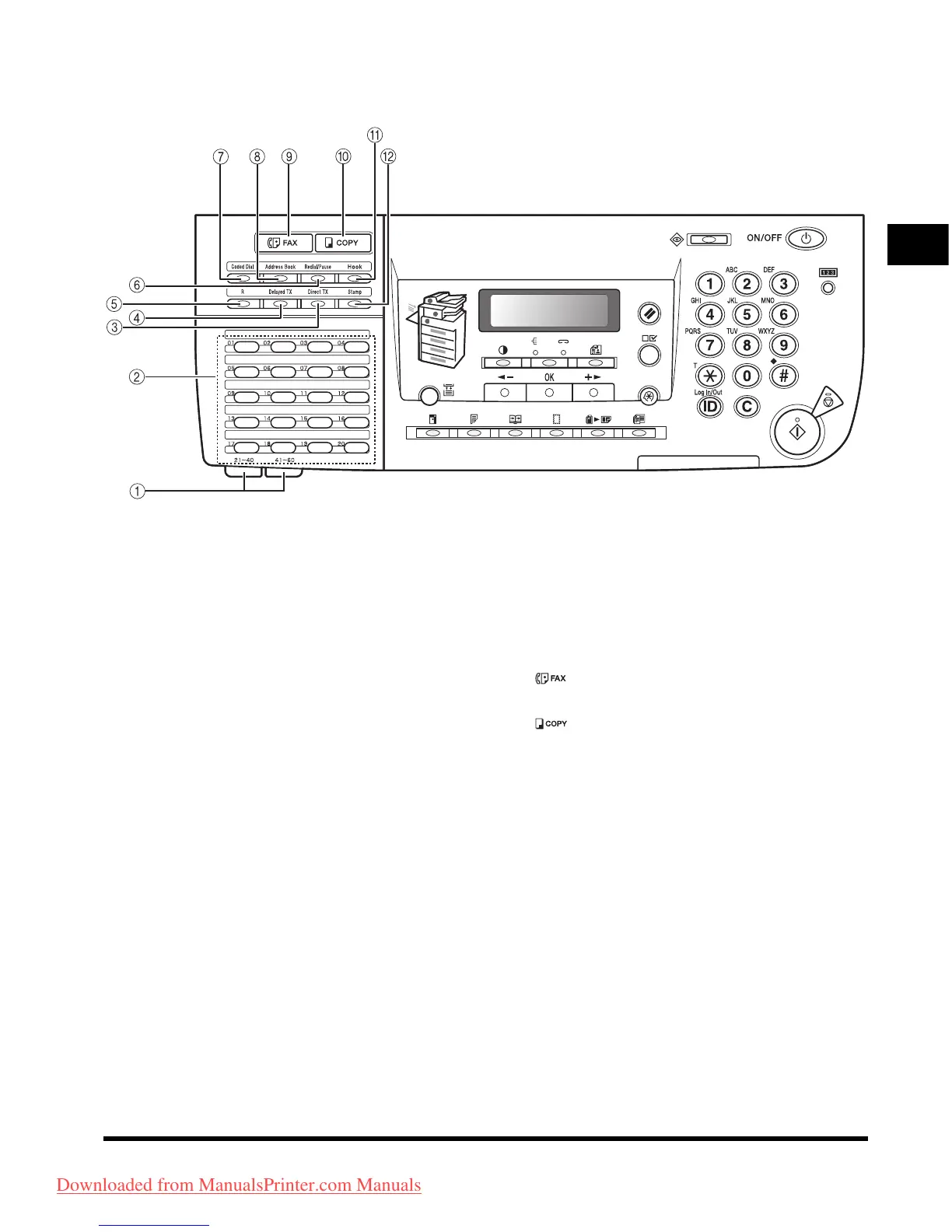
Facsimile Control Panel
a One-Touch Speed Dialing Panels
Open the first panel to display one-touch speed
dialing keys 21-40. Open the second panel to
display keys 41-60.
b One-Touch Speed Dial keys
Press to use one-touch speed dialing
(Pre-registered frequently used numbers).
c [Direct TX] key
Press to set Direct TX.
d [Delayed TX] key
Press to set Delayed TX.
e [R] key
Press to dial an outside line access number or
an extension number when the unit is connected
through a switchboard (PBX).
f [Redial/Pause] key
Press to redial the last dialed number when fax
is standing by.
Press to enter a pause between or after the
telephone/fax number when dialing or
registering numbers.
g [Coded Dial] key
Press to perform coded speed dialing.
h [Address Book] key
Press to search by name or fax/phone numbers
pre-registered with one-touch speed dialing keys
or coded speed dialing codes.
i [Fax] key
Press to switch to Fax mode.
j [Copy] key
Press to switch to Copy mode.
k [Hook] key
Press to monitor the line while dialing.
l [Stamp] key
Press to apply a stamp on the front side of the
originals after they have been scanned so that
you can determine whether a document was
scanned and send.
Downloaded from ManualsPrinter.com Manuals












 To Next Page