Operator´s Manual
1000-095-071-EN Rev. 1.1 OMNERA®
2020-09-14 Page 55
3 User Interface
3.1 Overhead Tube Crane
The overhead tube crane (OTC) can be moved to the correct position by autopositioning,
motorized movements or manual movements.
The OTC has a display that shows patient information, information of the tube angulation
and the selected workstation etc. The exposure parameters are shown and can easily be
changed from the OTC.
3.1.1 Direction of Movement
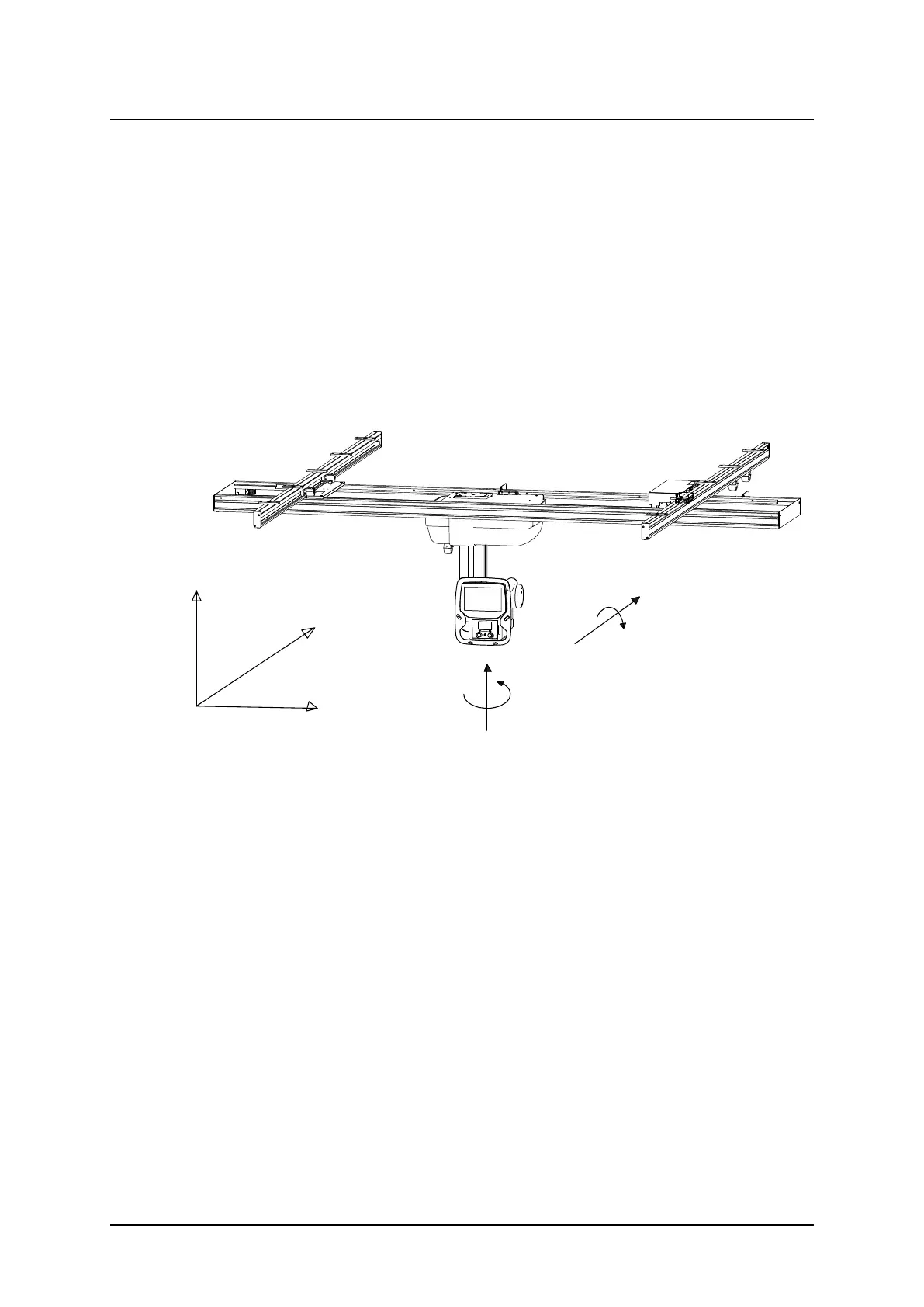
The figure below shows the movements of the OTC.
Fig. 3-1 OTC direction of movement
Z
Vertical movement Motorized
Y
Lateral movement Motorized and manual
X
Longitudinal movement
Motorized and manual
3.1.2 Sound Signal
• One sound signal, means that the OTC is in position and ready for exposure.
• Two sound signals, in rapid succession, indicates a fault and the display will show an error
message, for example after a collision. The error message shows the corrective action.
User Interface
Overhead Tube Crane



 To Next Page