OMNERA® 1000-095-071-EN Rev. 1.1
Operator´s Manual
Page 78 2020-09-14
3.2.10 Patient Size
The Patient size setting is used for a quick setting of the generator parameters to suit the
physique of the patient.
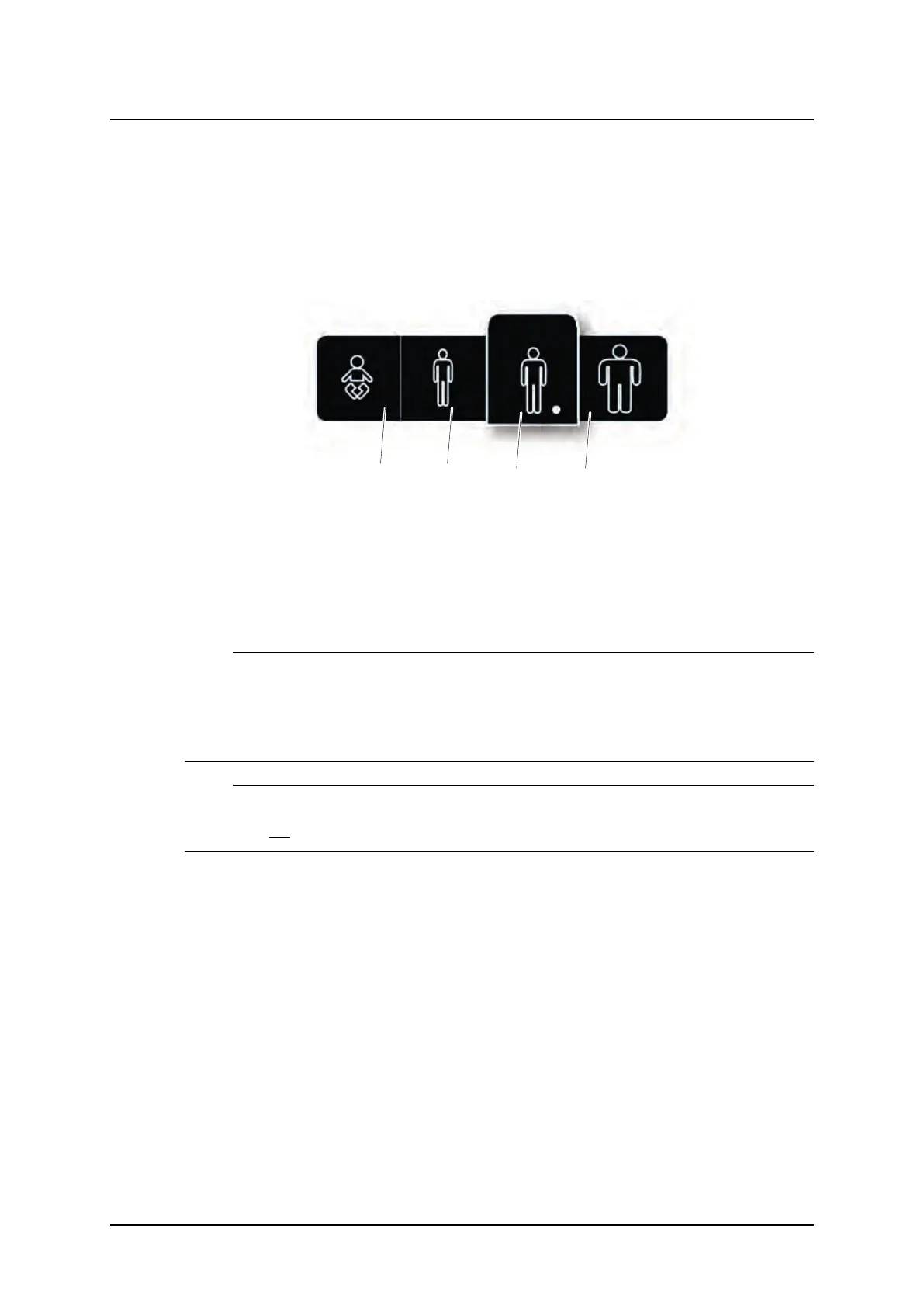
Patient size is adjusted by pressing the Patient size selection button. A pop-up window, ac-
cording to Fig. 3-27 Patient size selection, will open and show available patient sizes.
Fig. 3-27 Patient size selection
1. Paediatric
2. Small
3. Medium
4. Large
Select the desired Patient size. The pop-up window will automatically close shortly after the
selection.
Note!
The generator parameters and the collimator settings (field size and filter) will change to the
defined values for the new Patient size.
If no generator parameters or collimator settings are defined for the new Patient size (defined
in APR), the current values will be kept.
Note!
At the stitching procedure, a change of the Patient size for the first included image in the se-
quence, will not be kept for the following included images.
User Interface
Automatic Collimator Control



 To Next Page