EasyManua.ls Logo

Canon PC300 - Page 15

Canon PC300
129 pages
Print Icon
To Next Page IconTo Next Page
To Previous Page IconTo Previous Page
Loading...
«
GENERAL
DESCRIPTIO
Copying
on
OHP
Film
Manual
Feeding
*
Set
one
sheet
of
film
on
the
pick-up
tray
for
each
copy.
mH
PC300/FC210
¢
Depending
on
the
environment
of
the
1)
Set
a
document
on
the
copyboard.
site,
a
press
on
the
Copy
Start
key
2)
Adjust
the
Density
Control!
lever
to
suit
may
not
pull
the
film
inside
the
copier;
the.
document.
if
this
is
the
case,
perform
the
follow-
3)
Slide
the
pick-up
guide
to
suit
the
size
of
ing:
copy
paper.
4)
Insert
copy
paper
along
the
pick-up
1)
Place
copy
paper
under
the
film;
stagger
guide.
the
sheet
and
film
so
that
the
leading
*
The
copier
starts
copying
operation
edge
of
the
film
is
about
1
cm
behind
automatically
as
soon
as
it
detects
that
of
the
paper.
paper.
«
To
continue
copying,
insert
the
next
paper
when
the
copyboard
starts
to
OHP
tom
i
return.
Making
Two-Sided
Copies
1)
Turn
over
the
copy
while
maintaining
its
feeding
direction.
a
*
Make
sure
that
the
paper
is
not
moist
Copy
paper
or
curled.
«
Use
paper
of
60
to
128
g/m?
when
making
two-sided
copies.
*
Do
not
process
each
side
more
than
twice.
Figure
1-7
2)
Hold
the
trailing
edge
of
the
copy
paper,
and
set
the
sheet
and
film
on
the
pick-up
tray.
3)
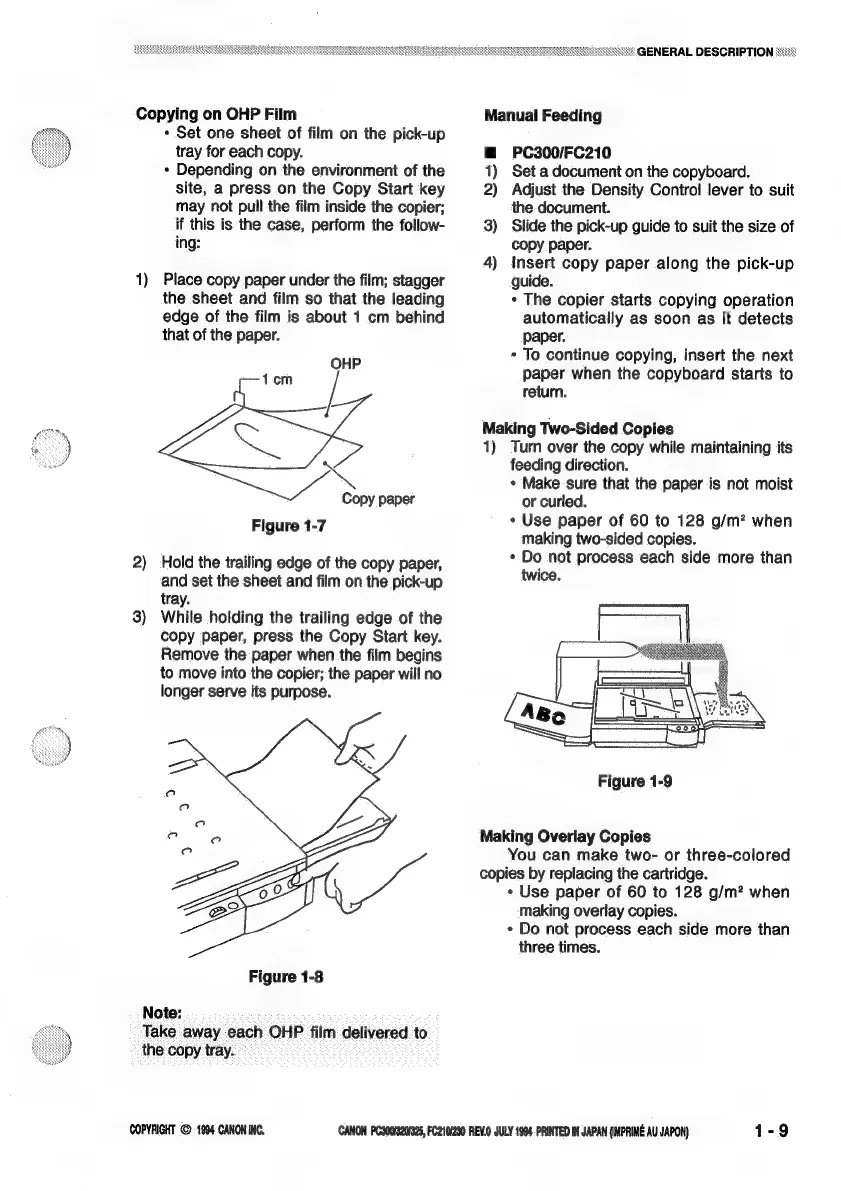
While
holding
the
trailing
edge
of
the
copy
paper,
press
the
Copy
Start
key.
Remove
the
paper
when
the
film
begins
to
move
into
the
copier;
the
paper
will
no
longer
serve
its
purpose.
Figure
1-9
Making
Overlay
Copies
You
can
make
two-
or
three-colored
copies
by
replacing
the
cartridge.
«
Use
paper
of
60
to
128
g/m?
when
making
overlay
copies.
*
Do
not
process
each
side
more
than
three
times.
Figure
1-8
Note:
Take
away
each
OHP
film
delivered
to
the
copy
tray.
COPYRIGHT
©
1994
CANON
INC.
CANON
PC3001320/925,
FC210/230
REV.0
JULY
1994
PRINTED
IN
JAPAN
(IMPRIME
AU
JAPON)
1-9

Related product manuals