EasyManua.ls Logo

Canon PC300 - Page 16

Canon PC300
129 pages
Print Icon
To Next Page IconTo Next Page
To Previous Page IconTo Previous Page
Loading...
GENERAL
DESCRIPTION
©.
Jam
Indicator
The
Jam
indicator
starts
to
flash
when
paper
jams
inside
the
copier.
*
Take
care
not
to
tear
the
paper
when
removing
it;
otherwise,
be
sure
to
remove
all
pieces
of
paper.
1)
Move
the
copyboard
to
the
left
until
it
stops.
2)
Press
the
open/close
button,
and
open
the
top
cover.
3)
Remove
the
jam.
*
If
the
jam
is in
the
pick-up
or
fixing
assembly,
hold
the
edge
of
the
paper
with
both
hands,
and
pull
it
out
slowly
through
the
opening
of
the
top
cover.
°
If
the
jam
is
in
the
delivery
assembly,
press
the
delivery
assembly
open/close
button
to
open
the
delivery
cover;
then,
detach
the
paper
from
the
delivery
cover,
and
pull
it
slowly
in
the
direction
of
delivery.
4)
Close
the
top
cover
and
delivery
cover;
then,
move
the
copyboard
to
the
center.
*
To
resume
copying,
switch
the
copier
ON,
set
the
desired
copy
count,
and
set
the
copy
density.
{.
Add
Paper
Indicator
M@
PC320/325/FC230
‘P’
flashes
if
you
try
to
make
a
copy
when
the
pick-up
tray
has
run
out
of
paper.
1)
Check
the
pick-up
tray
for
copy
paper.
2)
Ifo
paper
is
on
the
tray,
place
paper.
If
a
stack
of
paper
is
on
the
tray,
remove
it
first,
then
place
it
back
after
putting
its
edges
flush.
3)
Press
the
Copy
Start
key.
*
‘P’
goes
OFF,
and
the
remaining
num-
ber
of.copies
are
made.
1-10
COPYRIGHT
©
1094
CANON
INC.
=.
Replacing
the
Cartridge
i.
Time
to
Replace
the
Cartridge
When
the
cartridge
is
running
out
of
toner,
copies
tend
to
show
white
lines
or
ver-
tical
white
spots
(Figure
1-10).
Preface
‘anon
copier.
hod
of
use.
It
se
read
this
me
‘ith
its
capabilit
ng
this
manua
Thank
you
for
;
ure.
copier,
its
fuaclons
to
ensure
sale:
pes
in
order
to
fanv.iari.
functions.
Ait:
yo
ACAUTIO:”:
In
this
mann’
70%
AGES
with
this
procedure
ac:
It
in
personal
in
Figure
1-10
If
white
lines
or
spots
appear
on
copies,
replace
the
cartridge
as
follows:
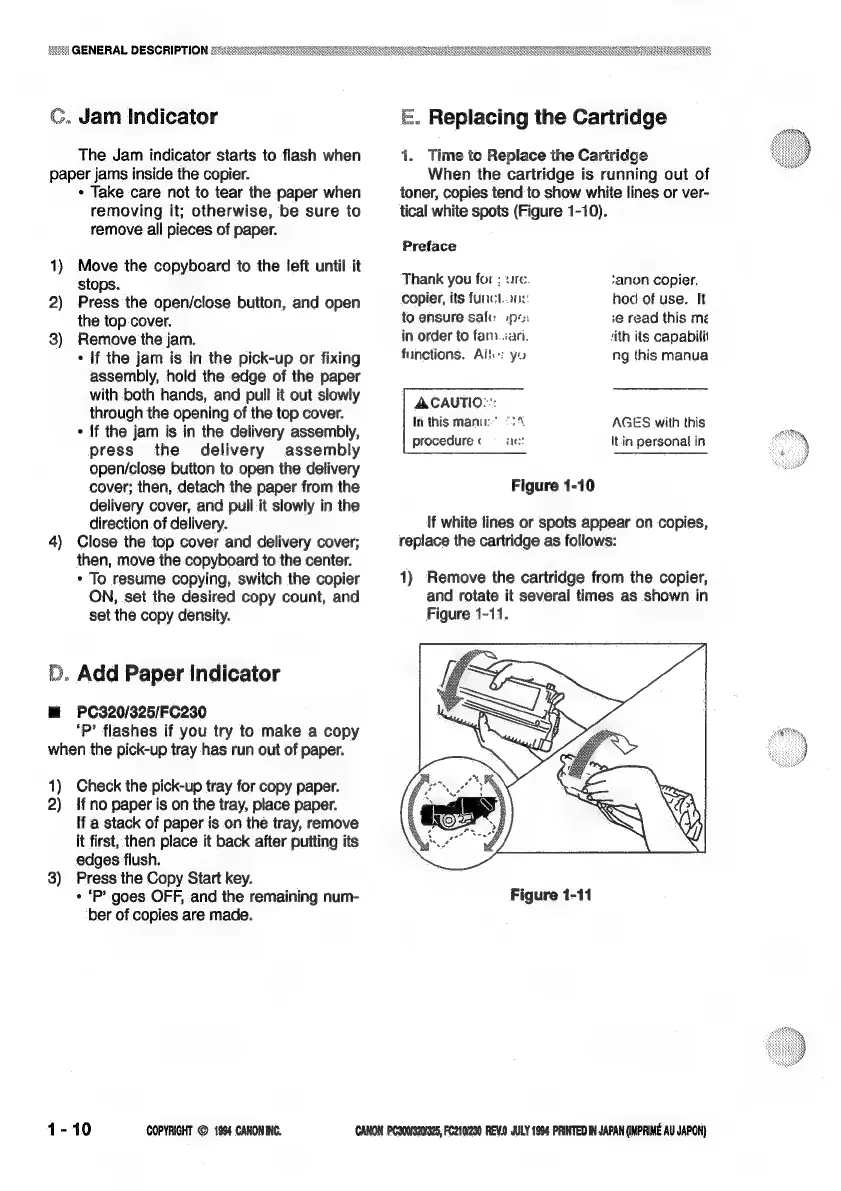
1)
Remove
the
cartridge
from
the
copier,
and
rotate
it
several
times
as
shown
in
Figure
1-11.
Figure
1-11
CANON
PC300320/925,
FC210/230
REVO
JULY
1994
PRINTED
IN
JAPAN
(MPRIME
AU
JAPON}

Related product manuals