Table of
Contents
Chapter 1
What is
ZoomBrowser EX?
Chapter 2
Downloading and
Printing Images
Chapter 3
What You Can Do with
a Camera Connected
Chapter 4
Viewing Images
Chapter 5
Organizing Images
Chapter 6
Using Supplementary
Features
Appendices Index
ZoomBrowser EX Software User Guide 104
Back Next
Editing Images (8/10)
Trim
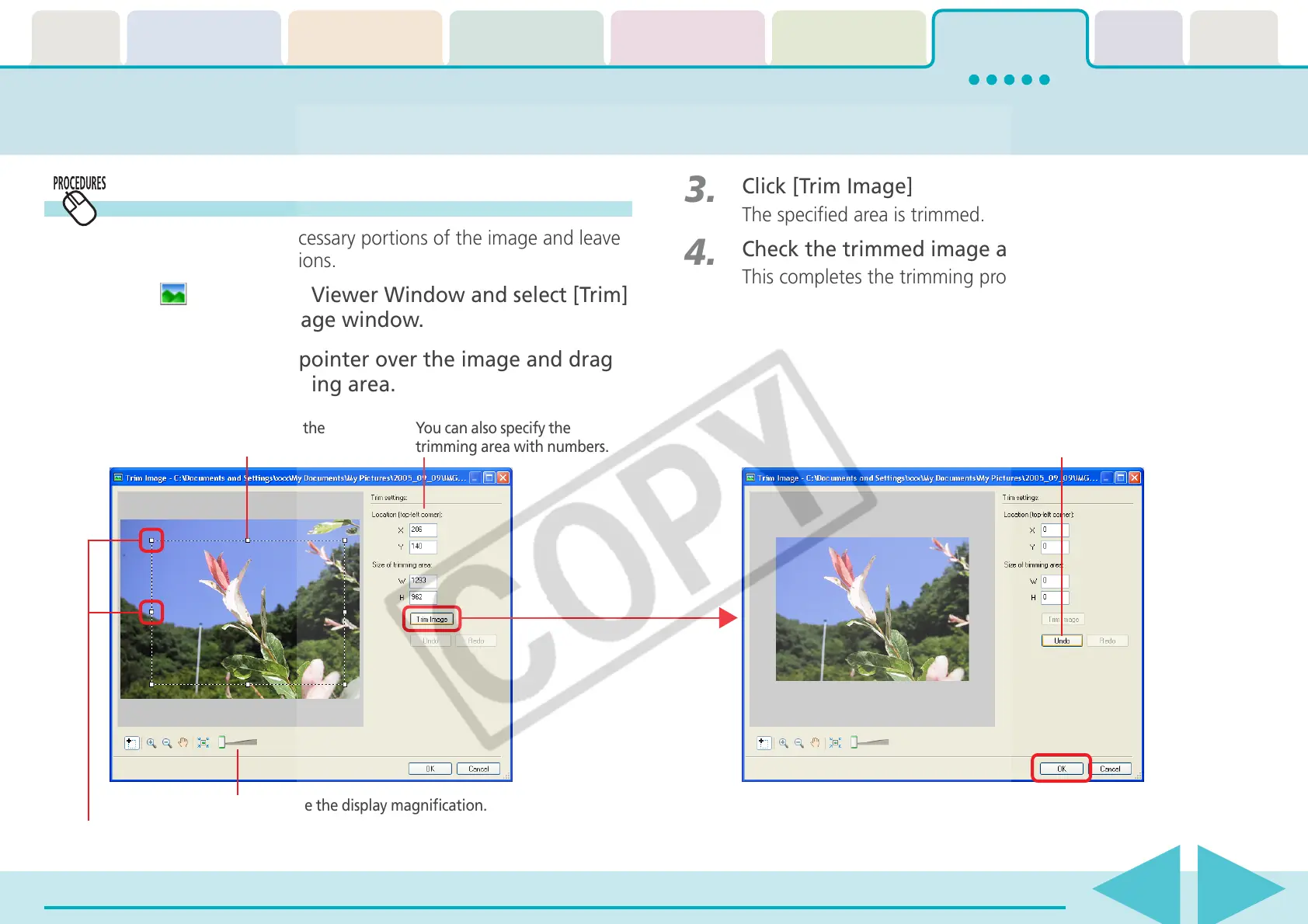
Use this to delete unnecessary portions of the image and leave
only the necessary portions.
1.
Click (Edit) in the Viewer Window and select [Trim]
to open the Trim Image window.
2.
Position the mouse pointer over the image and drag
it to select the trimming area.
3.
Click [Trim Image]
The specified area is trimmed.
4.
Check the trimmed image and click [OK].
This completes the trimming procedure.
You can change the display magnification.
Drag to specify the
trimming area.
You can also specify the
trimming area with numbers.
Use this to reset the
specified area.
You can adjust the trimming area by dragging
the corners or center points of the sides.














 To Next Page