6
Setting Up the Printer
7. Selecting a Printer Connection Method
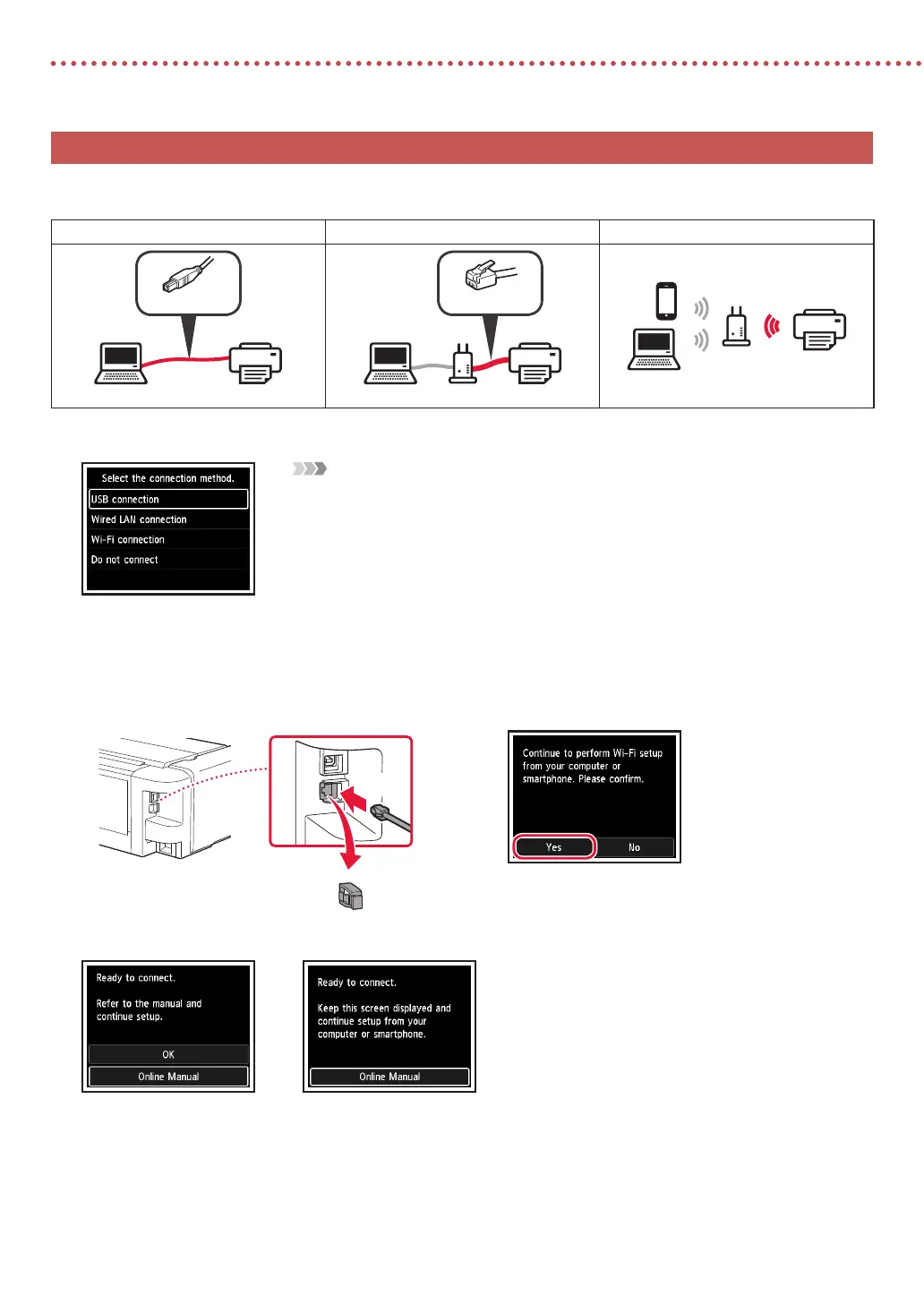
Select a printer connection method from the table below. In the following descriptions, "smartphone" is used to refer
collectively to smartphones and tablets.
USB connection Wired LAN connection Wi-Fi connection
USB cable
Router
LAN cable
Router
1
Use the {, } and OK buttons to select a connection method.
Note
You can set up your connection later, even if you select Do not connect.
When setting up the connection at a later time, refer to "8-a. Connecting to a Computer" on page
7 or "8-b. Connecting to a Smartphone" on page 8, and continue setup from your computer
or smartphone.
2
Follow the on-screen instructions to proceed with the setup.
•
If you select USB connection :
Do not connect a USB cable until instructed.
•
If you select Wired LAN connection :
The wired LAN connector is on the back of the printer.
Back
a
b
•
If you select Wi-Fi connection :
When Continue to perform Wi-Fi setup from your
computer or smartphone. Please conrm. appears,
select Ye s.
3
When either of the following screens appears, proceed to the next page.









 To Next Page