148 Additional Information
System Setup 2
1
Option not available when the camcorder is connected to an HDTV using an HDMI
cable.
2
Option available only from the original movies index screen.
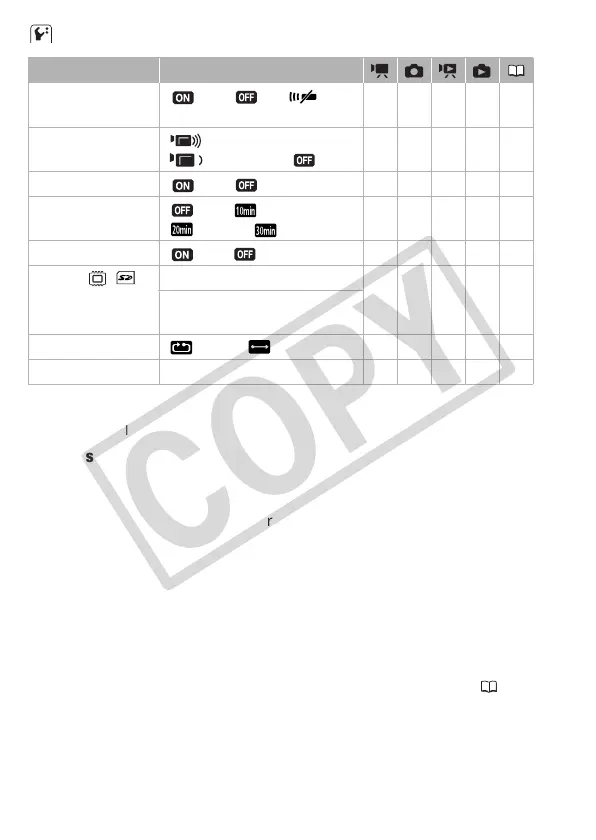
[Wireless Remote Control]: Allows the camcorder to be operated with the
wireless controller.
[Notification Sounds]: A beep will accompany some operations like turn-
ing on the camcorder, the self-timer countdown, etc.
[Power Saving Mode]: In order to save power when the camcorder is
powered by a battery pack, it will automatically shut off if left without any
operation for 5 minutes.
• Approximately 30 seconds before the camcorder shuts off, [Auto power
off] will appear.
• In standby mode, the camcorder will shut off after the time selected for
the [Quick Start] setting.
[Quick Start]: Select whether to activate the Quick Start function ( 48)
when you close the LCD panel in a recording mode and the length of time
after which the camcorder will end the standby mode and shut off auto-
matically.
Menu item Setting options
[Wireless Remote
Control]
[ On], [ Off ] zzzz –
[Notification Sounds] [ High Volume],
[ Low Volume], [ Off]
zzzz –
[Power Saving Mode] [ On], [ Off] zzzz –
[Quick Start] [ Off], [ 10 min],
[ 20min], [ 30min]
zz –––
[Control for HDMI]
1
[ On], [ Off] zzzz –
[Initialize / ] [Built-in Mem.], [Mem. Card] zzz
2
z 43
[Quick Initialization],
[Complete Initialization]
[Photo Numbering] [ Reset], [ Continuous] zzzz –
[Firmware] – – – – z –











 To Next Page