Photos 97
Basic Playback
Viewing Photos
To start directly in single photo view
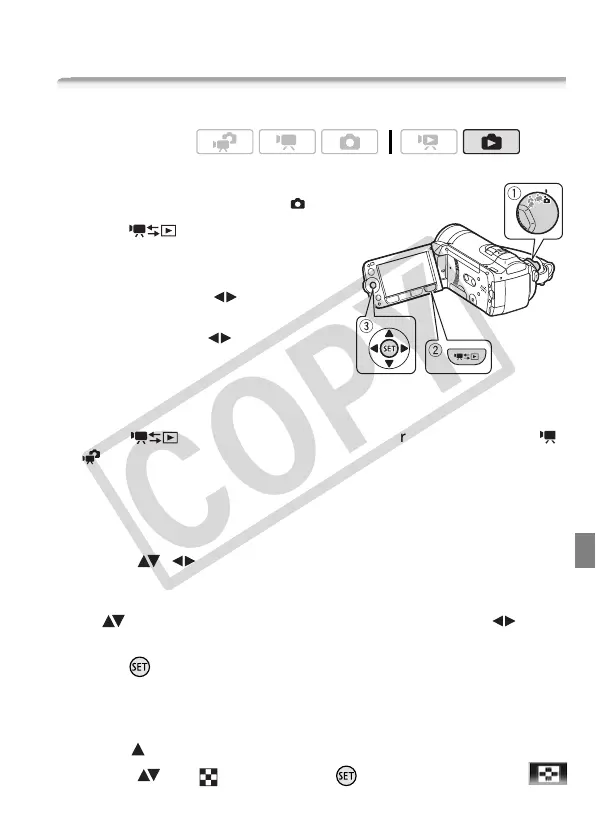
1 Set the camera mode dial to .
2Press .
The last photo recorded will be
displayed in single photo view.
3 Push the joystick ( ) to move
between photos.
Push the joystick ( ) and hold it
down to run quickly through the
photos.
To get to single photo view from the index screen
Pressing when recording with the camera mode dial set to
or will open the movie index screen.
1 Open the photo index screen.
• You can select the photos in the built-in memory or on the memory
card.
• You can change the number of photos displayed per index page.
2 Select ( , ) a photo.
• Move the orange selection frame to the photo you want to view.
• When you have recorded a large number of photos, you can display
( ) a slidebar below the photo thumbnails and browse ( )
through whole index pages.
3Press .
The selected photo is displayed in single photo view.
To get to the index screen from single photo view
1 Open ( ) the joystick guide.
2 Select ( ) the icon and press .
Operating modes:











 To Next Page