Introduction 23
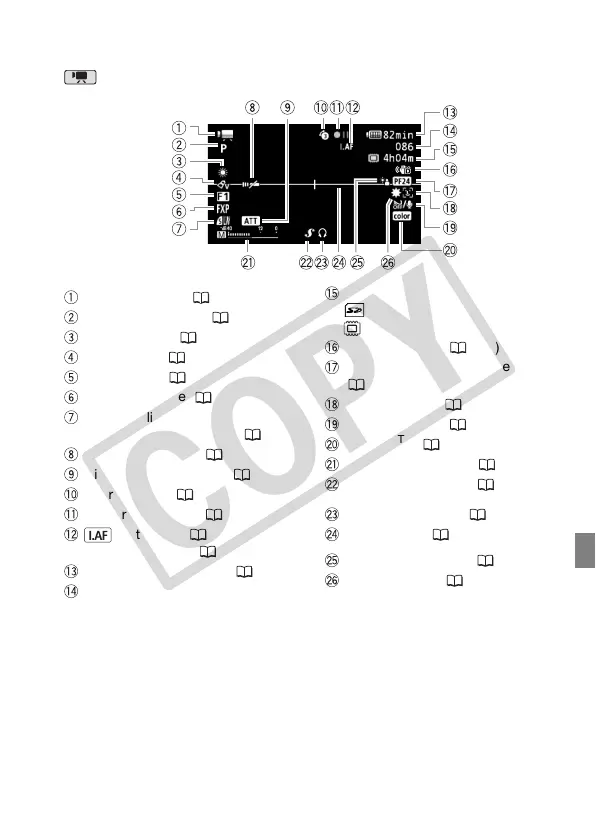
Screen Displays
Recording Movies
Operating mode ( 34)
Recording program ( 61, 64, 66)
White balance ( 76)
Image effect ( 77)
Digital effect ( 79)
Recording mode ( 46)
Photo quality/size
(simultaneous recording) ( 104)
Remote sensor off ( 148)
Microphone attenuator ( 143)
Pre-recording ( 71)
Memory operation ( 26)
Instant AF ( 142),
MF Manual focus ( 74)
Remaining battery time ( 26)
While recording/during playback:
Scene counter (hours : minutes :
seconds)
In record pause mode: Total number of
scenes
Remaining recording time
On the memory card
In the built-in memory
Image stabilizer ( 142)
24F progressive frame rate
( 26, 66)
Face detection ( 75)
Wind screen off ( 143)
x.v.Color
TM
( 140)
Audio level indicator ( 81)
Mini advanced shoe ( 84)
Headphone output ( 82)
Level marker ( 144)
Backlight correction ( 73)
Mini video light ( 66)











 To Next Page