Video 73
Manual Exposure Adjustment
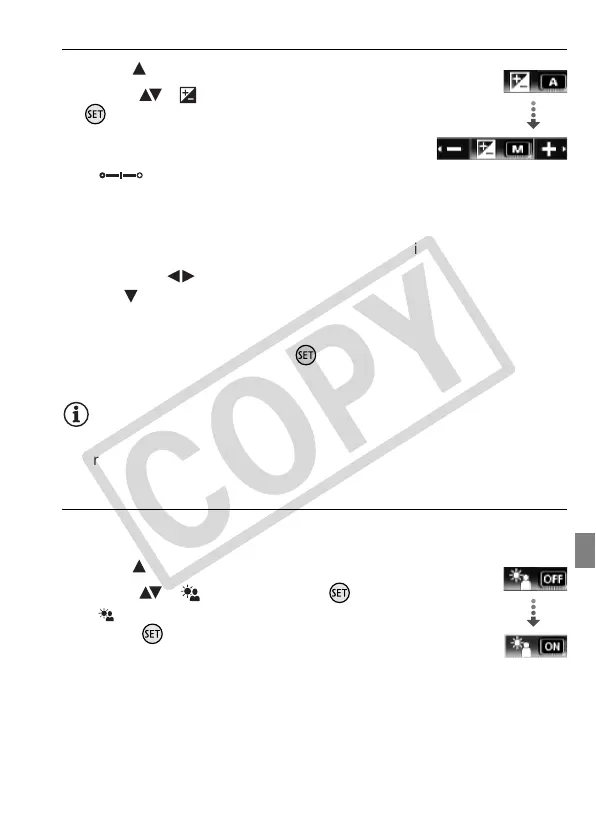
1 Open ( ) the joystick guide.
2 Select ( ) [ Exposure] and press
.
• The current exposure is locked.
• The exposure adjustment indicator
and the neutral value “±0” appear
on the screen.
• The adjustment range and the length of the exposure adjustment
indicator will vary depending on the initial brightness of the picture.
• If you operate the zoom, the brightness of the image may change.
3 Adjust the ( ) the brightness of the image as required, then
hide ( ) the joystick guide.
• The exposure adjustment indicator will change to white and the
selected exposure will be locked.
• During exposure lock, press twice to return the camcorder to
automatic exposure.
NOTES
• If the recording program is changed during exposure lock, the cam-
corder will return to automatic exposure.
Automatic Backlight Correction
When shooting subjects with a strong light source behind them, you
can have the camcorder automatically correct for the backlight.
1 Open ( ) the joystick guide.
2 Select ( ) [ BLC] and press .
• appears.
• Press again to turn off the backlight
correction.
Exposure
BLC











 To Next Page