7
Enjoying your Recordings on Other Devices
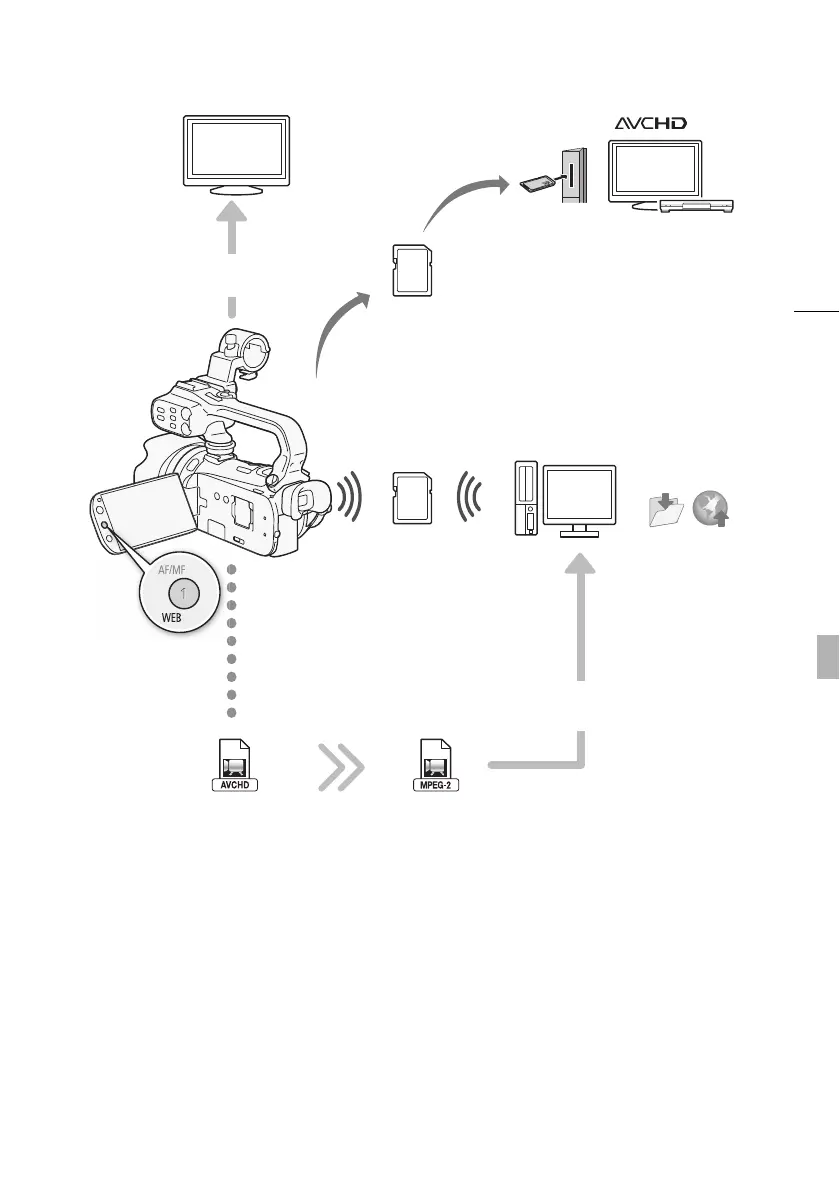
Eye-Fi
Connect the camcorder to an
HDTV (0 127)
Play video directly
from your recorded
memory card
AVCHD-compatible HDTVs and
digital recorders with a card slot
compatible with the type of
memory card used*.
Use an Eye-Fi card (0 142)
to wirelessly upload
recordings to your computer
or a video sharing Web site.
Save or upload to
the Web.
Standard Definition
Convert your HD movies, in the camcorder itself, to standard
definition files (0 139).
High Definition
Use the supplied PIXELA’s
software (0 135, 139).
* Refer to the instruction manual of the device. Depending on the device used, correct playback may
not be possible even if the device is AVCHD-compatible. In such case, play back the recordings on the
memory card using the camcorder.



 To Next Page