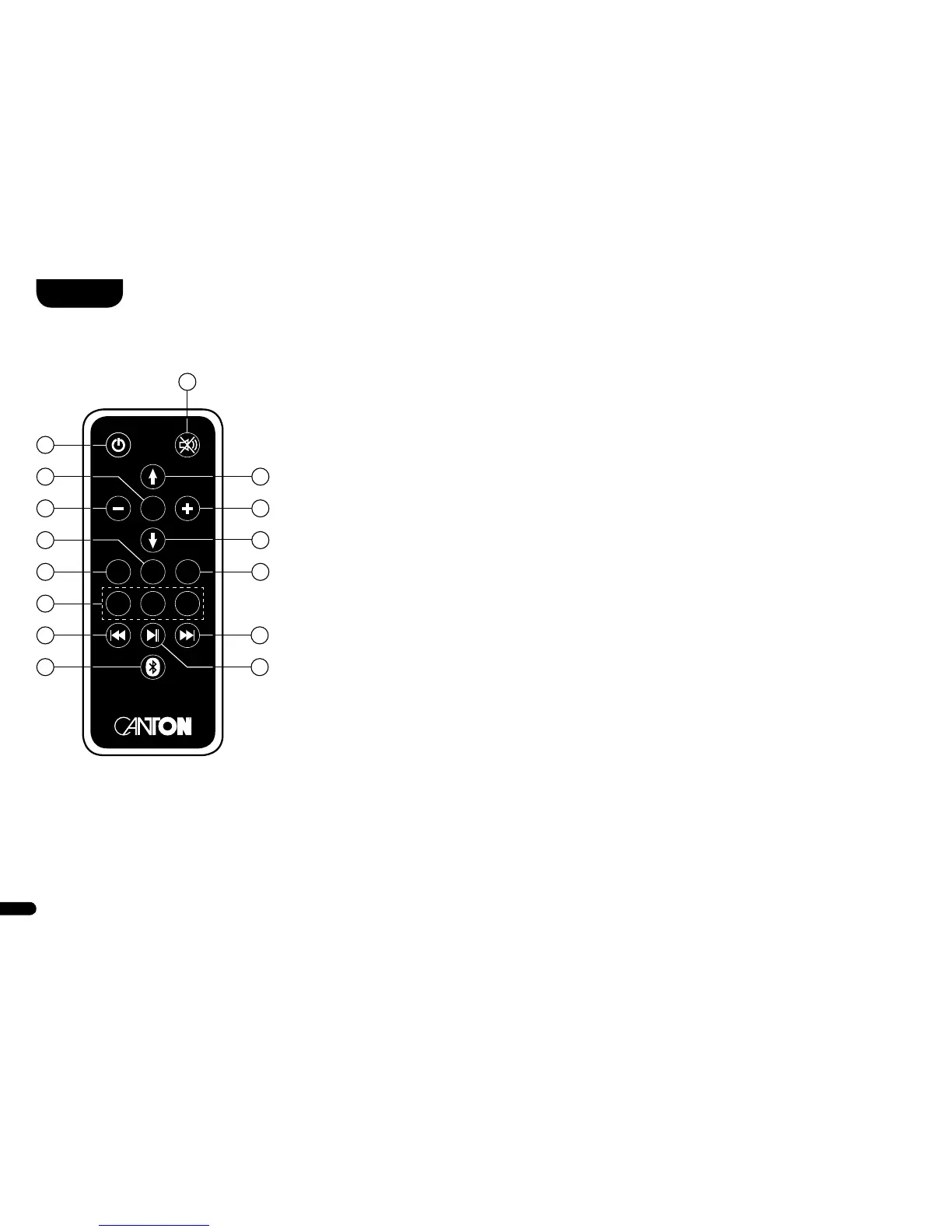
Operation
1) Change of operating state (power)
On – LED on the speaker shines green
Standby – LED on the speaker shines red
Off (disconnected from mains) – LED on speaker not illuminated
2) Mute
3) Upwards – Switches the signal input forwards / moves the selection
field up in the menu
4) Downwards – Switches the signal input back / moves the selection
field down in the menu
5) Confirmation (OK) – Switches to the next menu level / confirms a setting
6) Plus (+) – Increases the volume / increases the value in the menu
7) Minus (–) – Decreases the volume / decreases the value in the menu
8) Menu (M) – Switches to the setting menu / Switches to the previous
menu level
9) Switches between playback modes (Play Mode)
Stereo (ST) – Music playback
Movie (MOV) – (Virtual) Ambient sound for home theatre playback
Music (MUS) – Virtual stereo sound for music playback
Note: Play Mode “MUS” is not available with existing Surround speakers� When using the
symmetrical analogue input (XLR) or the asymmetrical analogue input (AUX) with direct
connection to the two speakers, only the Play Mode “ST” is available�
10) Change between the sound settings (Sound)
Bass (BAS) – Low-frequency adjustment via “+/–” keys (+ 6dB���–6 dB)
Midrange (MID) – Midrange adjustment via “+/–” keys (+ 6dB…–6 dB)
Treble (TRE) – Treble adjustment via “+/–” keys (+ 6dB…– 6dB)
12
1314
15
10
4
6
3
2
1
5
8
9
11
7
Remote
OK
M
1 2 3
PLAY
MODE
SOUND



 To Next Page