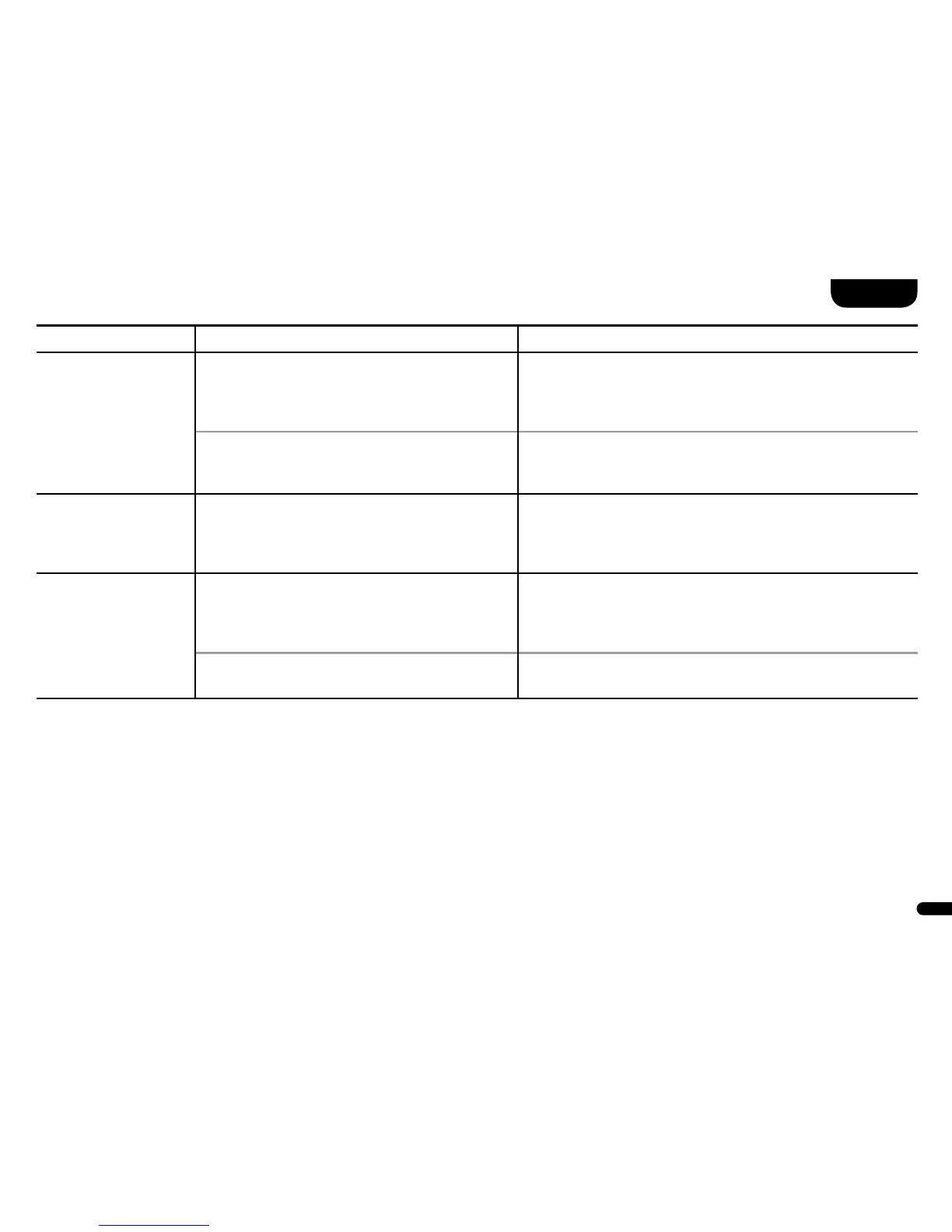
Problem Possible cause Solution
One or more spe-
akers do not play a
signal when the Line
or Balanced input is
selected�
1� The parameter ASM is set to DST and the
source device is connected to the same Line
connector (left resp� right) of both speakers�
1� If the parameter ASM is set to DST, be sure to connect the
left channel of the source unit to the jack marked L of the
left speaker and the right channel of the source unit to the
jack marked R of the right speaker�
2� The source device was connected only
to the master speaker�
2� If balanced (Analogue Balanced) input is selected, the
source must be connected directly to all speakers� Here,
pay attention to the correct channel assignment as well�
From one of the
speakers, there is
no sound�
The parameter SLC is set to WRD but the
master was not connected to the slave
via a coaxial cable�
If the SLC parameter is on WRD, there must be a cable
connection between the master digital coaxial output and the
slave digital coaxial input� If this is not the case, set
the parameter to WLS or establish the cable connection�
The speaker system
does not change in-
puts automatically�
1� The source device on the coaxial or optical
digital input has not been switched off or the
source device does not switch off its S/PDIF
transmitter in standby mode�
1� In order to switch from the coaxial or optical digital input,
the source device must be switched off�
2� The signal at the Line, Balanced or USB input
is too low�
2� Increase the output level on your source device�



 To Next Page